
You know that moment when you are stuck in a code looking at a feature to add and the usual tools give you code that is not very helpful? Yeah… I have been there too.Then I started using Claude Code.
In 2026 Claude Code from Anthropic is not another tool to help with coding. It is like a partner that helps you code lives in your terminal knows your project plans what to do step by step changes many files at once tests finds bugs and keeps trying until it works. I have been using it every day on projects and my own blog, about AI. The difference is big. It feels like working with a good engineer who is always available and understands how you like to do things.
If you are a developer, a solo maker or someone who takes AI tools seriously in 2026 you really need to learn how to use Claude Code.In this guide I will explain what Claude Code is, why it is the best, how to set it up and use it well give examples and share the questions you can ask to get results.
What Exactly Is Claude Code (And Why It’s Not Just Another Chatbot)
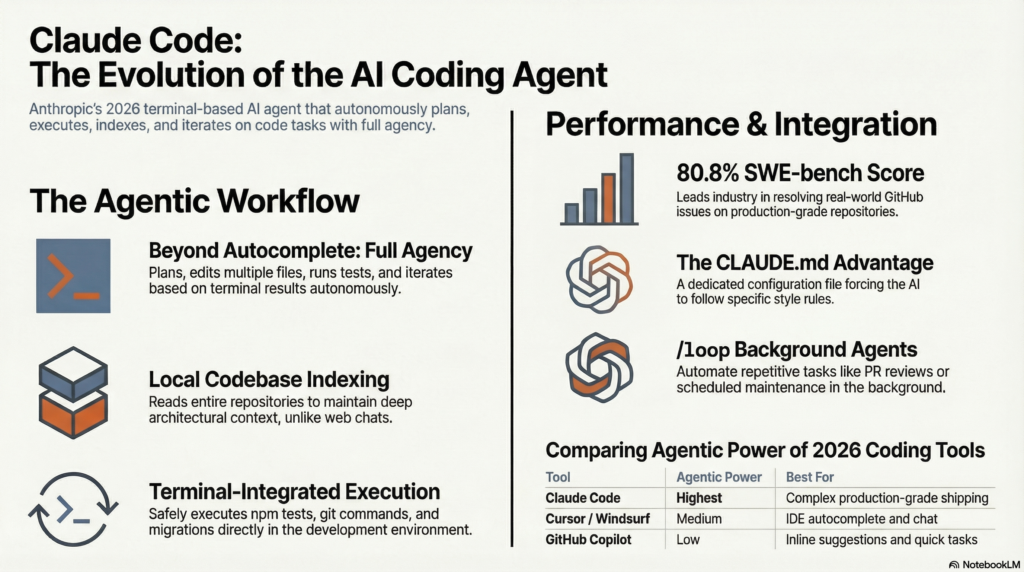
Claude Code is Anthropic’s official terminal-based AI coding agent. Unlike the browser-based Claude.ai (great for quick chats and Artifacts), Claude Code runs directly in your local development environment.
It gives Claude real agency:
- Reads and indexes your entire codebase
- Executes terminal commands safely
- Makes atomic multi-file changes
- Runs tests and fixes failures automatically
- Iterates based on results
Think of it like “Claude with powers”. It has the kind of thinking and reasoning you like from Claude Opus or Sonnet 4.6. Now it can actually do things not just talk about them.
As of March 2026 you can get it with Claudes plans like Max or Pro. It has become a platform that can do lots of things on its own. It has features like
- /loop, for tasks that happen on a schedule
- agents that can work in the background
- Even use your computer.
Why Claude Code Dominates Coding in 2026: The Benchmarks Don’t Lie
Developers aren’t switching to Claude Code for hype — the numbers back it up.
- SWE-bench Verified: Claude Opus 4.6 hits 80.8% (often leading or tying the top spot). That’s real GitHub issue resolution on production repos.
- Terminal-Bench: Claude Code consistently outperforms competitors in agentic terminal workflows.
- Developer preference: Multiple 2025–2026 surveys show ~70% of developers prefer Claude (especially with Code) for serious coding over ChatGPT or others.
Compared to ChatGPT Codex or GitHub Copilot:
- Claude Code excels at complex logic, large codebases, and multi-file refactoring.
- It writes cleaner, more secure, and better-explained code.
- Agentic execution (plan → edit → test → iterate) beats simple autocomplete.
Real talk: In my tests, Claude Code resolved tricky bugs in one session that would have taken me (or other AIs) multiple back-and-forths.
Key Features That Make Claude Code a Game-Changer
Here’s what actually sets it apart in daily use:
- Full Codebase Understanding
It indexes your repo so it knows how everything connects — no more “context lost” errors on big projects. - Agentic Multi-File Operations
Tell it to “add user authentication with JWT and update all API routes” — it plans, edits multiple files, and commits cleanly. - Terminal Integration & Tool Use
Runsnpm test,git push, database migrations — whatever you need — while staying sandboxed. - Iterative Debugging
It doesn’t just fix once. It runs tests, reads the output, and keeps refining. - Advanced 2026 Capabilities
/loopfor background/scheduled tasks (e.g., auto PR reviews)- Computer Use for browser-based workflows
- Voice Mode and mobile remote control
- Hooks for custom pre/post automation
- Artifacts Integration (when using alongside Claude.ai)
Live previews of frontend code, interactive React components, and shareable apps.
How to Get Started with Claude Code in Under 10 Minutes
- Subscribe: You need a Claude Pro or Max plan (the $100–$200 tiers include full Claude Code access).
- Install via CLI: Follow Anthropic’s official docs (simple
npm installor direct binary). - Point it at your repo:
claude-code initin your project folder. - Start chatting: Type natural instructions like “Plan and implement a dark mode toggle that persists across sessions.”
Pro tip: Create a CLAUDE.md file in your root with your coding style, tech stack preferences, and rules. Feed it once — Claude Code remembers and follows it religiously.
8 Battle-Tested Claude Code Prompts That Actually Work
These are the exact prompts I use daily (copy-paste ready):
1. Full Feature Implementation
Plan and implement [feature description] following our existing architecture. First explain the plan step-by-step. Then make all necessary file changes. After editing, run tests and fix any failures automatically.2. Deep Codebase Analysis
Explore the entire codebase and give me a detailed report on how [specific module] works, including dependencies and potential improvements.3. Smart Refactoring
Refactor this code for better performance and readability while keeping all functionality identical. Preserve our style guide from CLAUDE.md.4. Bug Fix with Root Cause
The following error occurred: [paste error]. Diagnose root cause step-by-step, then fix it across all affected files and verify with tests.5. New Project Bootstrap
Scaffold a complete [tech stack] app for [description]. Include folder structure, README, and first working feature.6. Security & Performance Audit
Perform a full security and performance review of the codebase. Flag issues by severity and provide fixed code snippets.7. Test Suite Generation
Write comprehensive unit and integration tests for [function/module]. Aim for 95%+ coverage.8. PR-Ready Changes
Implement [feature]. After completion, generate professional PR description with before/after summary and testing notes.Real-World Success Stories from Developers Using Claude Code
- Indie hacker: Built and shipped a full SaaS MVP in one weekend (what used to take weeks).
- Enterprise team: Automated repetitive refactoring across a 10k+ file monorepo.
- Data scientist (from Reddit threads): Switched from Jupyter to Claude Code for full pipeline engineering — faster iteration and cleaner code.
I’ve personally used it to rebuild parts of my AI blog’s backend, adding new features while maintaining zero downtime.
Claude Code vs. Other AI Coding Tools in 2026
| Tool | Best For | Agentic Power | Large Repo Handling | Winner for Most Devs |
|---|---|---|---|---|
| Claude Code | Complex, production work | Highest | Excellent | Overall |
| Cursor / Windsurf | IDE autocomplete + chat | Medium | Very Good | Speed |
| GitHub Copilot | Inline suggestions | Low | Good | Quick tasks |
| ChatGPT Codex | Fast prototyping | Medium | Good | Versatility |
Claude Code wins when you need something that actually ships production-grade code.
Common Limitations (And How to Work Around Them)
- Token usage can add up on massive tasks → Use prompt caching and break work into smaller sessions.
- Learning curve for agentic prompting → Start simple; the prompts above help.
- Not free → Worth it for serious developers (ROI is massive).
FAQs About Claude Code in 2026
Is Claude Code better than Cursor or Copilot?
For agentic, repo-aware development — yes, by a wide margin. Many devs use both (Claude Code for heavy lifting, Cursor for daily editing).
Do I need to be a senior developer to use it?
No. Beginners love it for learning (it explains everything), while pros use it to 10x output.
Is it safe to let it edit my files?
Yes — it asks for approval on changes, works in a sandbox, and you can review diffs.
Which model should I use?
Opus 4.6 for the toughest tasks; Sonnet 4.6 for speed and cost-efficiency.
How much does it cost?
Included in Pro/Max plans. Token pricing is competitive, especially with caching.
Ready to Make Claude Code Your New Coding Partner?
Claude Code is really great at helping people write code. It is the tool, in 2026. Claude Code makes you feel like you have a partner who is helping you, not a computer program that is giving you ideas. You can start using Claude Code now. Just put it on your computer. Try one of the things it can do on a small project. You will see how well it works.