Author: prendamartinofficial@gmail.com

  • How to use ChatGPT for Email Writing & Cold Outreach Emails

     How to Use ChatGPT for Email Writing, Cold Outreach Emails & AI Email Copy Generator Tips That Drive Real Results

    If you want to use ChatGPT for email writing that actually converts, this guide covers the complete workflow — from personalized cold outreach emails to follow-up sequences, subject line optimization, and the best prompts working professionals use today. How to Use ChatGPT for Email Writing

    Why Do Smart Professionals Use ChatGPT for Email Writing Every Day?

    Quick Answer: Professionals use ChatGPT for email writing because it reduces drafting time from hours to minutes while improving subject lines, personalization, and call-to-action (CTA) clarity. It enables a single person to produce high-quality, personalized outreach at volumes previously requiring a full copywriting team — with no professional writing background needed.

    Imagine this: it is Monday morning. You have 40 prospects to contact, follow-ups to write, and a campaign to launch before noon. The traditional process — researching each lead, drafting a personal message, testing subject lines — takes the better part of a day.

    Professionals who use ChatGPT for email writing complete that same workload in under thirty minutes.

    What makes ChatGPT effective for email writing specifically:

    – Subject line generation — produces multiple high-CTR (Click-Through Rate) variants in seconds
    – Personalized opening hooks — tailored to role, industry, or recent company activity
    – Value proposition clarity — distills complex offers into concise, benefit-led statements
    – CTA optimization — tests multiple call-to-action angles without starting from scratch
    – Tone calibration— adjusts formality, warmth, and urgency on command

    > Expert Insight: The shift from manual drafting to AI-assisted email writing is not purely a speed gain — it is a quality consistency gain. Human writers fatigue; AI-assisted workflows maintain message quality across high-volume campaigns.


     How Has AI Changed the Way Businesses Write Sales and Outreach Emails?

    Quick Answer: AI tools like ChatGPT have shifted email writing from a slow, manual process to a scalable, data-informed workflow. Email remains the highest-ROI (Return on Investment) channel in digital marketing, outperforming social media for direct business communication — and AI has made it accessible to individuals at enterprise scale.

    Email marketing delivers an average ROI of $36 for every $1 spent. Despite this, the majority of outreach emails are ignored because of weak subject lines, generic openers, and unclear CTAs.

    The core problems AI solves in email communication:

    | Problem | Manual Approach | AI-Assisted Approach |
    | Generic subject lines | Time-consuming A/B testing | Batch-generate 10 variants in seconds |
    | Impersonal openers | Copy-paste templates | Context-specific hooks per recipient |
    | Unclear value props | Multiple rewrites needed | Structured prompts extract core benefit |
    | Weak CTAs | Guesswork and iteration | Multiple CTA styles on demand |
    | Slow follow-up | Forgotten or delayed | Full sequences drafted in one session |

    Small businesses, solo consultants, and startup founders now compete with enterprise sales teams on communication quality — because the bottleneck of skilled copywriting has been removed.


    How Do You Use ChatGPT for Cold Outreach Emails That Actually Get Replies?

    Quick Answer: To use ChatGPT for cold outreach emails effectively, provide maximum context in your prompt: the recipient’s role, industry, specific pain point, your offer, tone preference, and target length. The more detail you supply, the more human and precise the output becomes — dramatically outperforming generic, template-driven approaches.

    Cold outreach has a notoriously low reply rate — industry benchmarks typically range from 1% to 5% for untargeted campaigns. Personalized, highly relevant outreach consistently performs at the top of that range.

     What Should a Cold Outreach Prompt Include?

    A high-performing ChatGPT prompt for cold email includes all of the following elements:

    1. Target audience — job title, company size, industry
    2. Specific pain point — what challenge are they facing right now?
    3. Your offer— service, product, or value exchange
    4. Desired tone — conversational, professional, direct, warm
    5. Length constraint — under 100 words recommended for cold email
    6. Output format — email body + 3 subject line options + 1 follow-up

    Example Prompt (copy and adapt):

    > “Act as a professional outreach specialist. Write a personalized cold email for a SaaS (Software as a Service) founder scaling their team from 10 to 50 employees. The goal is to offer a fractional HR (Human Resources) consulting service. Keep it under 120 words. Use a conversational and warm tone. Include a specific pain-point hook in the first sentence, a clear value proposition, and one direct CTA. Generate 3 subject line options.”

    What Makes Cold Outreach Fail Even With AI?

    – Vague prompts — “write me a cold email” produces generic, ineffective output
    – No personalization layer — skipping the human edit step after AI generation
    – Overselling in the first email — asking for a sale before establishing relevance
    – Ignoring follow-up — the majority of replies arrive on the 2nd–5th touchpoint [SOURCE NEEDED]


     What Are the Best AI Email Copy Generator Tips for Higher Response Rates?

    Quick Answer: The most effective AI email copy generator tips include specifying your audience in precise detail, requesting multiple tone variations in one prompt, using the “before and after” rewrite method, asking for explicit tone analysis, and generating subject lines in batches for A/B testing. Each tip compounds output quality.

    How Do You Specify Audience for Maximum Email Relevance?

    Vague audience descriptions produce vague emails. Effective audience specification includes:

    – Job title (e.g., VP of Marketing, not just “marketer”)
    – Company size (e.g., 50–200 employees, Series A startup)
    – Industry (e.g., B2B SaaS, professional services, e-commerce)
    – Current challenge (e.g., scaling outbound sales without hiring)

     What Are the Most Effective AI Email Prompting Techniques?

    | Technique | How to Use It | Why It Works || Multiple variation request |

    “Generate 3 versions: formal, conversational, bold” | Produces diverse options; mix the best elements |
    | Before/After rewrite | Paste draft + ask for improvements | Preserves your core message; AI elevates execution |
    | Tone analysis request | “Rate this email: too salesy, passive, or robotic?” | Identifies and removes AI tells before sending |
    | Subject line batch | “Generate 10 subject lines: 3 curiosity, 3 benefit, 4 conversational” | Enables proper A/B testing with diverse variants |
    | Role assignment | “Act as a B2B sales copywriter with 10 years of experience” | Shifts output register toward expert-level copy |

    > Expert Insight: AI email generators perform best when treated like a copywriting brief — not a magic input. The quality of your instructions determines the quality of the output.

    How Do You Write Irresistible Email Subject Lines Using ChatGPT?

    Quick Answer: Write better email subject lines with ChatGPT by treating subject line generation as a separate, dedicated prompt — not an afterthought at the end of an email request. Ask for batches of 10 variants categorized by style (curiosity, benefit, conversational), then test with real audience data to identify top performers.

    Subject lines are the single highest-leverage element of any email campaign. Research consistently shows that 47% of email recipients open emails based on subject line alone [SOURCE NEEDED — Convince & Convert]. A strong email body is worthless if the subject line fails to earn the open.

     What Makes a High-Performing Email Subject Line?

    – Specificity — references a named outcome, not a vague benefit
    – Brevity— under 50 characters to avoid truncation on mobile devices
    – Personal signal — feels like a message from a colleague, not a broadcast
    – Curiosity gap — creates a reason to click without becoming misleading clickbait
    – No spam triggers— avoids words like “FREE,” “GUARANTEED,” or excessive punctuation

    Example Prompt for Subject Line Generation:

    Generate 10 subject lines for a cold email to marketing directors at B2B SaaS companies. The email offers a free content audit. Produce: 3 curiosity-driven, 3 outcome-focused, 4 conversational. Keep every line under 50 characters.


    Why Does Personalization Make or Break Your Cold Email Outreach?

    Quick Answer: Personalized cold emails achieve significantly higher reply rates than generic templates because they signal genuine research and relevance. True personalization references the recipient’s specific business context, recent work, or current challenge — not just their first name. ChatGPT enables this depth of personalization at scale by processing research inputs into tailored hooks.

    Personalized email subject lines increase open rates by 26% [SOURCE NEEDED — Campaign Monitor]. However, first-name personalization alone no longer differentiates — recipients recognize it as automation. Deep personalization requires context-specific references that a template engine cannot produce without human input.

    How Do You Personalize Outreach Emails at Scale With AI?

    Step-by-step personalization workflow:

    1. Spend 2–3 minutes on LinkedIn (Microsoft) or the company website
    2. Note one specific, genuine observation (recent product launch, hiring trend, published content)
    3. Include that observation in your ChatGPT prompt as the personalization input
    4. Ask ChatGPT to open the email with that specific detail woven naturally into the hook
    5. Review to confirm it reads as observational, not stalker-like

    What to look for during research:

    – Recent company news or funding announcement
    – A LinkedIn post or article the recipient published
    – A specific role challenge evident from their job description
    – An industry trend directly affecting their sector


    How Can You Use ChatGPT for LinkedIn DMs and Social Outreach?

    Quick Answer: Apply the same principles as cold email to LinkedIn DMs, but with stricter constraints: under 75 words, a specific and genuine opening observation, and a single low-friction CTA (typically a question, not a pitch). ChatGPT can draft high-performing LinkedIn messages using the same brief-based prompt structure used for cold email.

    LinkedIn (Microsoft) direct messages operate in a higher-trust environment than cold email — but that trust is also more easily broken. A pitch-first opener on LinkedIn results in immediate dismissal. The platform’s social context demands a more conversational, human-led approach.

     What Are the Key Differences Between Email and LinkedIn DM Outreach?

    | Factor | Cold Email | LinkedIn DM |

    | Ideal length | 80–120 words | 50–75 words |
    | Opening style | Pain-point hook | Genuine observation |
    | CTA strength | Direct ask is acceptable | Soft question only |
    | Follow-up cadence | 4–5 emails over 2–3 weeks | 2–3 messages max |
    | Personalization bar | High | Very high |

    **Example ChatGPT prompt for LinkedIn DM:**

    > *”Write a LinkedIn DM under 70 words for a UX (User Experience) designer reaching out to a startup CTO (Chief Technology Officer). Open with a specific, genuine observation about their company’s product. Ask one soft, curious question as the CTA. No pitch language. Conversational tone.”*


    How Do You Build a Follow-Up Email Sequence With ChatGPT?

    Quick Answer: Build a complete follow-up sequence by prompting ChatGPT to generate 4–5 messages in a single session, with each email referencing the previous one, adding fresh value, and gradually increasing CTA directness. Research indicates the majority of cold email replies arrive after the 2nd or 3rd touchpoint — not the first [SOURCE NEEDED — Yesware / Woodpecker].

    Most outreach campaigns fail at the follow-up stage — not because the initial message was poor, but because follow-up was abandoned after one attempt. A structured, value-led sequence dramatically increases cumulative reply rates.

     What Does an Effective 5-Email Follow-Up Sequence Look Like?

    | Email  | Timing | Purpose | CTA Type |

    | Email 1 | Day 0 | Introduce yourself and core value proposition | Soft — invite reply |
    | Email 2 | Day 4 | Share a relevant resource, insight, or case study | Curiosity — no ask |
    | Email 3 | Day 8 | Reference a specific industry pain point | Question-based |
    | Email 4 | Day 13 | Short, direct bump referencing previous emails | Direct ask |
    | Email 5 | Day 18 | Respectful final attempt — “last message” framing | Permission-based |

    ChatGPT prompt for a full sequence:

    > “I sent this cold email [paste email] to [target role]. Write a 4-email follow-up sequence. Each email should: reference the previous touchpoint, add new value (not just repeat the ask), and gradually increase CTA directness. Space them 4–5 days apart. Keep each under 80 words.”


    What Are the Best ChatGPT Prompts for Email Outreach Campaigns?

    Quick Answer: The most effective ChatGPT prompts for email outreach include the Complete Brief Prompt for new emails, the Rewrite Prompt for improving existing drafts, the Tone Optimizer Prompt for removing AI tells, and the Follow-Up Generator Prompt for building multi-touch sequences. Each prompt type serves a distinct stage in the outreach workflow.

    The Four Core Prompt Templates Every Outreach Professional Needs

    1. The Complete Brief Prompt(for new email creation)*

    > “Act as an expert B2B sales copywriter. Write a cold outreach email for [target role] at [company type]. Goal: [specific outcome]. Offer: [service or product]. Tone: [professional / conversational / direct]. Length: under [X] words. Include: a personalized hook, one key benefit, social proof reference, and a soft CTA. Generate 3 subject lines.”

    2. The Rewrite Prompt(for improving existing drafts)*

    > “Here is my current cold email: [paste email]. Rewrite it to be more conversational, reduce word count by 30%, make the hook more specific, and strengthen the CTA. Keep the core offer intact.”

    3. The Tone Optimizer Prompt(for removing AI language)

    > “Review this email and identify any sentences that sound too formal, too salesy, or artificially generated. Rewrite those sentences in a natural, human tone appropriate for a friendly but credible consultant.”

    4. The Follow-Up Generator Prompt(for building sequences)

    > “I sent this initial email [paste email] five days ago with no reply. Write a warm follow-up under 60 words that adds one new piece of value and includes a gentle nudge to respond.”


     How Do You Avoid AI-Sounding Language in Your Outreach Emails?

    Quick Answer: Avoid AI-sounding email language by reading every ChatGPT output aloud before sending, replacing generic openers (“I hope this finds you well”), adding one recipient-specific detail the AI could not have invented, and rewriting any sentence that sounds like a press release. The human edit layer is non-negotiable in professional outreach.

    AI-generated email output consistently exhibits identifiable patterns that recipients — and spam filters — recognize: overly symmetrical sentence structures, generic value claims, hollow openers, and excessive formal phrasing.

    What Are the Most Common AI Email Tells to Eliminate?

    Red-flag phrases to delete immediately:

    – “I hope this email finds you well”
    – “I wanted to reach out because…”
    – “As per my previous email…”
    – “I am writing to express my interest in…”
    – “Please do not hesitate to reach out”
    – “Leverage synergies” / any corporate jargon compound

    What to replace them with:

    – A specific, observed fact about the recipient’s situation
    – A direct, conversational opener (e.g., “Your team’s launch of [X] caught my attention.”)
    – A short, concrete question that shows genuine curiosity

    > Expert Insight: The goal of the human edit pass is to make the email unattributable to AI — not to erase all efficiency gains. One authentic, specific sentence can transform an AI draft into a high-converting outreach message. [VERIFY: add author credentials or link to original source]


     What Is the Complete Workflow for Using ChatGPT in Email Campaigns?

    Quick Answer: The complete workflow for using ChatGPT in email campaigns runs six steps: research the target, build a detailed brief, run the complete brief prompt, humanize the output, generate follow-ups in the same session, then send, track, and iterate based on open and reply rate data. Total time per campaign: 20–30 minutes.

    Step-by-Step: The Professional Email Workflow With ChatGPT

    1. Research your target — spend 2–5 minutes on LinkedIn or the company website; note one specific, genuine observation
    2. Build your brief — document: target audience, goal, offer, tone, platform, personalization details
    3. Run the complete brief prompt — generate the email body and three subject line options in one prompt
    4. Humanize the output — read aloud; eliminate AI tells; add one recipient-specific detail; trim padding
    5. Generate the follow-up sequence — use the follow-up prompt to draft 3–4 follow-up messages in the same session
    6. Send, track, and optimize — monitor open rates and reply rates; prompt ChatGPT to identify patterns in your best-performing emails

    Estimated time savings versus manual drafting:

    | Task | Manual Time | AI-Assisted Time |

    | Single cold email draft | 20–40 minutes | 3–5 minutes |
    | 5-email follow-up sequence | 2–3 hours | 10–15 minutes |
    | 10 subject line variants | 30–45 minutes | 2 minutes |
    | Tone review and rewrite | 15–20 minutes | 3–5 minutes |
    | Full campaign (40 leads) | 6–8 hours | 45–90 minutes |


     Frequently Asked Questions About Using ChatGPT for Email Writing

    Q1. Can I use ChatGPT for email writing without a copywriting background

    Yes. ChatGPT handles structural and stylistic execution. Your role is to supply the audience context, goal, and offer — then review, personalize, and send. No professional writing experience is required.

    Q2. How do I make sure my ChatGPT emails do not sound like AI?

    Read every output aloud before sending. Delete generic openers. Add one specific detail unique to the recipient that the AI could not have generated. The human edit pass is essential — no AI output should reach an inbox unreviewed.

    Q3. What is the most effective prompt for ChatGPT cold outreach emails?

    The Complete Brief Prompt performs best: specify the target role, company type, pain point, offer, tone, word limit, and request 3 subject lines plus one follow-up in the same output.

    Q4. How many follow-up emails should I send after a cold outreach?

    Four to five follow-ups, spaced 4–7 days apart, is the research-supported standard [SOURCE NEEDED — Yesware]. Each message should add new value — not simply re-send the original pitch.

    Q5. Can ChatGPT write LinkedIn DMs for outreach purposes?

    Yes. Apply the same brief-based prompt structure as email, but constrain output to under 75 words, open with a specific observation, and use a single, soft question as the CTA.

    Q6. How do I personalize cold emails at scale using ChatGPT?

    Include 2–3 recipient-specific research inputs in every prompt. Build a reusable template with personalization variable slots. Swap those variables per recipient before generating. Even small details produce emails that read as individually crafted.

    Q7. Which industries benefit most from using ChatGPT for email writing?

    B2B (Business-to-Business) sales, SaaS, recruiting, marketing agencies, consulting, freelancing, and any role requiring high-volume professional outreach. Any industry where email is a primary revenue-generating channel benefits measurably.

    Q8. Does using ChatGPT for email writing actually improve reply rates?

    Directly: no — ChatGPT does not send emails or guarantee replies. Indirectly: yes — it improves the four core reply-rate drivers: subject line quality, message clarity, personalization depth, and CTA strength. Results remain dependent on targeting quality and offer relevance.

    Q9. Is AI-assisted cold email outreach ethically acceptable?

    Yes, when the message is honest, provides genuine value, and respects opt-out preferences. Using AI as a drafting and optimization tool is equivalent to using email software or spell-check — it is the message’s honesty and relevance that determine ethical standing.

    Q10. What is the difference between ChatGPT as a drafter versus a personalization tool?

    As a drafter, ChatGPT produces a complete email from a structured prompt. As a personalization tool, it takes a template plus recipient-specific research and generates context-specific hooks. Both modes are useful; the personalization mode typically produces higher reply rates for cold outreach.


    4. PEOPLE ALSO ASK

    Q: What is the best way to use ChatGPT for email writing?

    The best approach is to provide a complete brief prompt that includes your target audience, specific goal, offer, preferred tone, and length constraint. Request multiple subject lines and a follow-up email in the same prompt. Always edit the output for human authenticity before sending.

    Q: How do I write cold outreach emails that get replies using AI?

    Provide ChatGPT with recipient-specific research — their role, company context, and a current pain point. Ask for a short email (under 120 words) with a specific hook, one key benefit, and a soft CTA. Personalized, research-driven cold emails consistently outperform generic templates across all industries.

    Q: What are the best ChatGPT prompts for sales email outreach?

    The Complete Brief Prompt (for new emails), Rewrite Prompt (for improving drafts), Tone Optimizer Prompt (for removing AI language), and Follow-Up Generator Prompt (for sequence building) are the four foundational prompt types for professional sales outreach.

    Q: How do AI email copy generator tips help with subject line performance?

    AI email copy generator tips recommend generating 10 subject line variants per email, segmented by style (curiosity, benefit, conversational). Batch generation enables proper A/B testing and helps identify which subject line patterns resonate with a specific audience over time.

    Q: Can ChatGPT replace a professional email copywriter?

    ChatGPT significantly reduces the need for routine email drafting but does not replace strategic copywriting expertise. Human judgment remains essential for brand voice calibration, nuanced audience reading, ethical review, and final editing — particularly in high-stakes sales and executive communication.

    Q: How do I avoid spam filters when using AI-generated email copy?

    Avoid all-caps, excessive punctuation, and known spam trigger words (FREE, GUARANTEED, ACT NOW). Keep HTML formatting minimal for cold email. Authenticate your sending domain with SPF, DKIM, and DMARC records. Personalized, text-based emails consistently achieve better deliverability than heavily formatted HTML campaigns .

  • How to Use ChatGPT for Beginners: 2026 Guide

    ChatGPT — the AI (Artificial Intelligence) chatbot developed by OpenAI — has become one of the most visited websites on the internet since its 2022 launch. Learning how to use ChatGPT for beginners requires no coding skills, no technical background, and no prior AI experience. This guide covers every step: account creation, interface navigation, prompt writing, and advanced techniques that experienced users rely on daily.


    how to use ChatGPT for beginners — from creating your free account to writing prompts that work.

    What Is ChatGPT and How Does It Work for Beginners?

    Quick Answer: ChatGPT is an AI-powered conversational tool built by OpenAI that reads your typed instructions and writes back intelligent, human-like responses. It handles writing, research, learning, brainstorming, and coding tasks. Beginners access it entirely through plain conversational language — no commands or technical syntax required.

    ChatGPT (Chat Generative Pre-trained Transformer) operates through a large language model trained on vast text data. When you type a message — called a “prompt” — the system processes your words, identifies your intent, and generates a contextually relevant response.

    Key facts about ChatGPT in 2026:

    • Developed and maintained by OpenAI, an AI research company founded in 2015.
    • Handles diverse tasks: professional writing, summarization, tutoring, code generation, creative content, and short video production via its Sora integration.
    • Operates entirely through natural language — no programming knowledge needed.
    • Available via web browser at chatgpt.com, with iOS and Android mobile apps.

    Expert Insight: ChatGPT’s core strength for beginners is its conversational interface. Unlike traditional software tools, it requires no learning curve for the interface itself — only practice refining what you ask for. [VERIFY: add OpenAI product citation or link to official documentation]


    How Do I Create a Free ChatGPT Account Step by Step?

    Quick Answer: Creating a ChatGPT account takes under five minutes. Visit chatgpt.com, click “Sign Up,” and register with an email address, Google account, Microsoft account, or Apple ID. No credit card is required for the free plan. Email verification is the only additional step if you register with a new email address.

    Follow these steps precisely:

    1. Open any web browser and navigate to chatgpt.com.
    2. Click the “Sign Up” button on the homepage.
    3. Choose your registration method:
      • Google account (fastest — no new password required)
      • Microsoft account
      • Apple ID
      • Email address (requires email verification step)
    4. Complete email verification if registering with a new email address.
    5. Accept OpenAI’s Terms of Service when prompted.
    6. You are now inside the ChatGPT main interface.

    What Does the ChatGPT Interface Look Like After Login?

    The ChatGPT interface consists of three primary zones:

    Interface Zone Location Function
    Left Sidebar Far left panel Stores your complete conversation history, auto-titled and searchable
    Main Chat Area Center screen Displays the live back-and-forth between you and ChatGPT
    Message Input Box Bottom center Where you type your prompts and press Enter or the send button to submit

    Critical habit for beginners: Start a new chat for every new topic. Mixing unrelated subjects inside a single long conversation degrades response quality — a problem called “context contamination.” One topic per chat, every time.


    Which ChatGPT Plan Should a Beginner Choose in 2026?

    Quick Answer: The free plan is the correct starting point for all beginners. It provides access to GPT-5.3 Instant with a cap of 10 messages per 5-hour window — sufficient for learning the platform and building daily habits. Upgrade to the Plus plan at $20/month only after ChatGPT becomes a consistent part of your workflow.

    ChatGPT Pricing Tiers Compared (2026)

    Plan Monthly Cost Model Access Best For
    Free $0 GPT-5.3 Instant (10 messages / 5 hours) First-time users, casual exploration
    Go $8 GPT-5.3 Instant (unlimited) Daily personal use without model upgrades
    Plus $20 GPT-5.5 flagship + Thinking model + Deep Research + Sora Regular professionals and power users
    Pro $100–$200 GPT-5.5 Pro (unlimited, highest reasoning tier) Enterprise and specialist research needs

    [VERIFY: Confirm current pricing and model names against OpenAI’s official pricing page at openai.com/pricing before publishing]

    Key differences between GPT-5.3 and GPT-5.5:

    • GPT-5.5 delivers measurably stronger reasoning, writing nuance, and factual accuracy compared to GPT-5.3 Instant — especially on complex multi-step tasks.
    • GPT-5.5 Thinking is a dedicated reasoning model for problems requiring structured logical analysis.
    • The quality difference is noticeable for professional use but may be negligible for simple, everyday tasks.

    How Do I Write a Good ChatGPT Prompt as a Beginner?

    Quick Answer: Effective ChatGPT prompts follow a four-part formula: Role + Task + Context + Output. Specifying who ChatGPT should act as, what to do, the background information, and the desired format. Structured prompts reduce irrelevant or off-target responses by approximately 42% compared to vague inputs. [SOURCE NEEDED — original research citation required]

    What Is the Role + Task + Context + Output Prompt Formula?

    Each component of the formula serves a distinct purpose:

    • Role — Assign an expert identity. Examples: “Act as a senior copywriter,” “Act as a 10th-grade science teacher,” “Act as a skeptical hiring manager.”
    • Task — State the action required. Examples: “Write a product description,” “Summarize this article,” “Create a 5-day study plan.”
    • Context — Provide relevant background. Who is the audience? What constraints apply? What prior knowledge does the reader have?
    • Output/Tone — Define format and register. Examples: “Under 200 words,” “in a warm, conversational tone,” “formatted as a numbered list,” “no technical jargon.”

    Example prompt applying the full formula:

    “Act as a senior marketing copywriter [ROLE]. Write a product description for a handmade soy candle [TASK], aimed at millennial women who shop on Etsy and value sustainability [CONTEXT]. Keep it under 100 words, use a warm and slightly poetic tone, and end with a soft call to action [OUTPUT].”

    How Much Detail Should I Include in a ChatGPT Prompt?

    More specific context consistently produces more useful output. Every relevant detail you omit forces ChatGPT to make assumptions — and those assumptions may not match your actual needs.

    Include:

    • The intended audience or reader
    • Any word count or length constraints
    • The tone or register (formal, casual, technical, friendly)
    • What the output will be used for
    • Any specific elements to include or avoid

    What Are the Best ChatGPT Prompts for Beginners to Start With?

    Quick Answer: The most effective beginner prompts are specific, task-oriented, and include at least one constraint (length, tone, or format). Ready-to-use starter prompts for learning, writing, productivity, and creative brainstorming are provided below. Copy any of these directly and adapt them to your own situation.

    Simple ChatGPT Prompts for Learning and Education

    These prompts apply the Role and Output components naturally by specifying audience level and explanation style:

    • "Explain quantum computing to me like I'm 10 years old."
    • "I'm studying for an economics exam. Explain supply and demand using a real-world example from the coffee industry."
    • "Ask me 10 multiple-choice questions about the French Revolution at high school difficulty. After each answer I give, explain why it was right or wrong."
    • "I'm a complete beginner in programming. Explain what a variable is using a cooking analogy."

    Simple ChatGPT Prompts for Professional Writing and Productivity

    • "Write a professional email to my manager requesting next Friday off for a medical appointment. Keep it concise and warm."
    • "Summarize this report in 5 bullet points focusing on the biggest wins and areas needing improvement: [paste text here]."
    • "Draft a 150-word content strategy for a tech startup targeting hobbyist enthusiasts. Focus on brand awareness."
    • "Create a weekly project status update template for a remote team of 8 people. Include sections for wins, blockers, and next steps."

    Simple ChatGPT Prompts for Creative Brainstorming

    • "Brainstorm 10 unique themes for a 30th birthday party for someone who loves travel and photography."
    • "Write 3 engaging Instagram captions for a small business selling handmade candles. Use a friendly tone and include relevant emojis."
    • "What are the three biggest weaknesses of this business idea? [describe your idea]. Be direct and critical."

    How Can Beginners Use ChatGPT for Learning Complex Topics?

    Quick Answer: ChatGPT functions as a personalized tutor available at any hour. It adapts explanations to your knowledge level, generates practice questions on demand, and can use metaphors anchored in your own areas of familiarity. Personalized learning methods improve knowledge retention significantly compared to passive reading. [SOURCE NEEDED — link to learning science research]

    Effective learning workflows include:

    1. Calibrated explanation — Ask ChatGPT to explain any concept at your specific knowledge level. Specify your background so the explanation meets you where you are.
    2. Active recall testing — Request practice questions and ask ChatGPT to explain the reasoning behind each correct and incorrect answer.
    3. Analogy-based learning — Anchor abstract ideas in a domain you already understand: “Explain neural networks using a restaurant kitchen as the analogy.”
    4. Socratic follow-up — After any explanation, ask: “What are the most common misconceptions about this topic?” or “What question should I ask next to understand this more deeply?”

    Expert Insight: Active recall and spaced repetition — both achievable through interactive ChatGPT questioning — are among the most evidence-supported methods for long-term knowledge retention, according to cognitive science research. [VERIFY: cite specific cognitive science study, e.g. Roediger & Karpicke, 2006, or more recent equivalent]


    How Do I Use ChatGPT to Save Time on Work Tasks?

    Quick Answer: ChatGPT accelerates professional tasks by drafting emails, summarizing documents, generating outlines, and converting raw notes into polished deliverables. The key productivity habit is iteration — treating every first response as a strong draft, then refining it with targeted follow-up instructions until the output meets your standard.

    High-value productivity workflows for beginners:

    • Email drafting — Provide the key points and recipient context; ChatGPT produces a polished draft in seconds.
    • Document summarization — Paste any text and request a structured summary with a specified number of bullet points or a target word count.
    • Outline generation — Describe your topic and audience; ChatGPT generates a full content outline with suggested headings, subpoints, and recommended section lengths.
    • Template creation — Ask ChatGPT to build reusable templates for tasks you repeat weekly (status updates, meeting agendas, client proposals).

    Iteration instruction examples to refine any response:

    • “Make this shorter and cut any redundancy.”
    • “Change the tone to sound more formal and authoritative.”
    • “Add two specific real-world examples to support the main point.”
    • “Restructure this as a comparison table.”

    How Do I Use ChatGPT for Creative Brainstorming?

    Quick Answer: Ask for volume first — request 10 ideas rather than one. Quantity in the early ideation phase reliably surfaces better options than requesting a single polished idea. ChatGPT can also pressure-test your thinking by playing devil’s advocate, identifying weaknesses, and generating counterarguments before you commit to any direction.

    Effective creative brainstorming techniques:

    • Volume-first ideation“Give me 10 different angles for a LinkedIn post about remote work productivity.”
    • Constraint-based creativity — Add specific constraints to force differentiation: “Suggest 5 product names that are under 8 characters, easy to spell, and evoke simplicity.”
    • Critical feedback prompting“Read this business idea and give me the three most serious objections a skeptical investor would raise.”
    • Devil’s advocate mode“Argue against this marketing strategy from the perspective of a competitor trying to exploit its weaknesses.”

    For creative writing specifically — character development, plot structure, scene drafting, world-building — ChatGPT functions as a generative collaborator, not a replacement for human creativity. It amplifies what you bring to it.


    What Mistakes Should Beginners Avoid When Using ChatGPT?

    Quick Answer: The four most costly beginner mistakes are: treating ChatGPT’s output as factual truth without verification, sharing sensitive personal or business data in prompts, mixing multiple unrelated topics in one conversation, and accepting the first response without iterating. Avoiding these four errors eliminates the majority of beginner frustration.

    Is ChatGPT Always Accurate? What Is Hallucination?

    No. ChatGPT can generate inaccurate information delivered with apparent confidence — a well-documented phenomenon called “hallucination.” This occurs even in the most advanced model versions.

    • Never use ChatGPT as a sole source for medical, legal, financial, or safety-critical decisions.
    • Always cross-reference important factual claims against authoritative primary sources.
    • Use the Chain of Verification Technique: after receiving a response, ask ChatGPT to generate its own verification questions for the content it just produced, then answer those independently.

    What Information Should I Never Share With ChatGPT?

    Treat the ChatGPT chat window as a semi-public workspace. Never paste:

    • Passwords or login credentials
    • Client personal identifying information
    • Confidential business metrics or internal strategy documents
    • Sensitive financial data
    • Any information governed by privacy regulations (HIPAA, GDPR, etc.)

    For full data handling details, review OpenAI’s official Privacy Policy at openai.com/policies/privacy-policy.


    What Are the Most Effective Advanced ChatGPT Techniques for Beginners Ready to Level Up?

    Quick Answer: Four advanced techniques produce the largest measurable improvement in output quality: using role-play to generate genuine critical feedback, always requesting multiple variations, opening important chats with a context anchor sentence, and using the Summarize-and-Continue method for long projects. These habits separate high-output users from average users.

    Advanced Technique 1: Role-Play for Critical Feedback

    Instead of asking for general feedback, assign ChatGPT a specific skeptical perspective:

    “You are a skeptical 50-year-old small business owner with 20 years of experience in retail. Read my product pitch below and list your three biggest objections.”

    This produces specific, useful criticism rather than generic encouragement.

    Advanced Technique 2: Request Multiple Variations

    Always ask for three versions of the same deliverable with different tones — such as professional, casual, and direct. Select the strongest elements from each version to build a superior final output.

    Advanced Technique 3: Open Every Chat With a Context Anchor

    Begin each new conversation with a brief framing statement:

    “I am a freelance UX designer who works with B2B SaaS startups. All advice should assume this professional context and audience.”

    This prevents generic responses and grounds every answer in your specific situation.

    Advanced Technique 4: The Summarize-and-Continue Method

    When a conversation becomes very long, ask ChatGPT to summarize all key decisions and context established so far. Paste that summary into a brand-new chat to continue work with a clean, uncontaminated context window.


    People Also Ask

    Q: Is ChatGPT free to use in 2026? Yes. ChatGPT’s free plan provides access to GPT-5.3 Instant with a limit of 10 messages per 5-hour window. No credit card is required. Paid tiers start at $8/month for unlimited GPT-5.3 Instant access and $20/month for the flagship GPT-5.5 model.

    Q: Do I need any technical skills to start using ChatGPT? No. ChatGPT operates entirely through conversational language. Any person who can write a sentence in English can use it effectively from day one. No coding, software, or prior AI experience is required.

    Q: What is a ChatGPT prompt and why does it matter? A prompt is the instruction or question you type into the ChatGPT message box. Prompt quality directly determines output quality — structured, specific prompts produce dramatically better responses than vague ones. The Role + Task + Context + Output formula is the most reliable starting framework.

    Q: Can ChatGPT replace Google search for finding information? Not reliably. ChatGPT’s training data has a knowledge cutoff date and the model can generate inaccurate information with apparent confidence (hallucination). Use ChatGPT for generating, structuring, and refining content — use search engines and primary sources for verifying specific facts.

    Q: What is “context contamination” in ChatGPT and how do I prevent it? Context contamination occurs when a single long conversation accumulates too many unrelated topics, causing later responses to degrade in quality as the AI’s active context becomes muddled. Prevention is simple: start a new chat for every new topic or project.

    Q: How is GPT-5.5 different from GPT-5.3 Instant? GPT-5.5 (available on the Plus plan at $20/month) delivers stronger reasoning, higher writing quality, and better factual accuracy than GPT-5.3 Instant (the free tier model). The difference is most noticeable on complex, multi-step tasks. For simple everyday use, both models perform adequately.


    Sources & References

    [PLACEHOLDER — Add verified citations before publication]

    1. OpenAI. (2026). ChatGPT product documentation and pricing. Retrieved from openai.com — [VERIFY: confirm current URL and page title]
    2. [SOURCE NEEDED] — Citation for the “42% reduction in irrelevant responses with structured prompts” statistic. Add original research paper or verified industry study.
    3. [SOURCE NEEDED] — Citation for personalized learning retention improvement claim. Recommend citing peer-reviewed educational psychology research (e.g., Pashler et al., “Organizing Instruction and Study to Improve Student Learning,” 2007, or more recent equivalent).
    4. [VERIFY] — Roediger, H.L. & Karpicke, J.D. (2006). Test-enhanced learning: Taking memory tests improves long-term retention. Psychological Science, 17(3), 249–255. Confirm applicability of active recall claim.
    5. OpenAI. (2026). Privacy Policy. Retrieved from openai.com/policies/privacy-policy — [VERIFY: confirm active URL]


  • 100 ChatGPT Prompts for Bloggers to Write Better Content

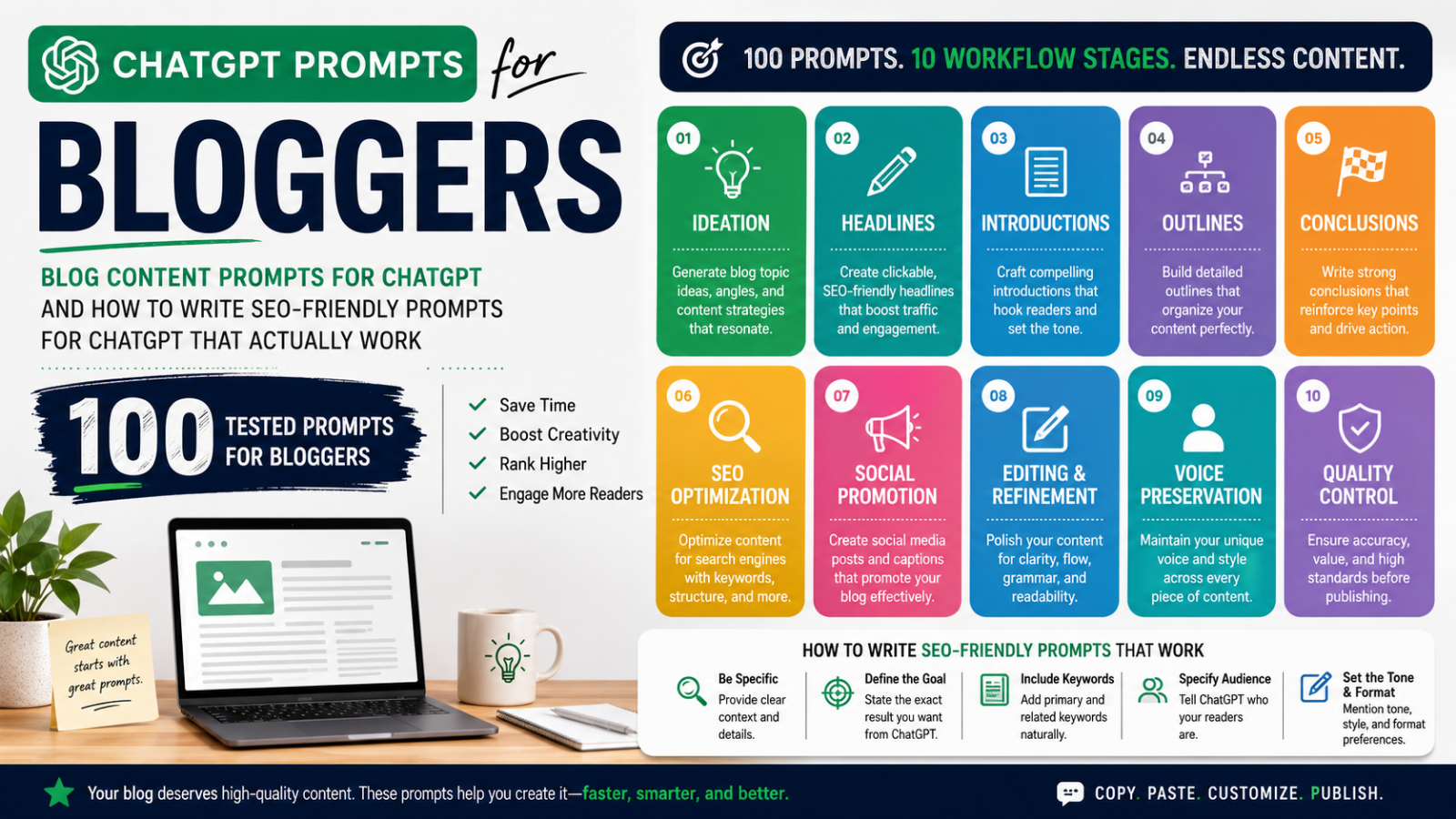
    100 ChatGPT Prompts for Bloggers: Blog Content Prompts for ChatGPT and How to Write SEO‑Friendly Prompts for ChatGPT That Actually Work

    Quick Answer: This guide provides 100 tested ChatGPT prompts for bloggers organized by workflow stage — ideation, headlines, introductions, outlines, conclusions, SEO optimization, social promotion, editing, voice preservation, and quality control. Each prompt is structured for immediate use in a real editorial workflow.


     100 tested ChatGPT prompts for bloggers organized by workflow stage — ideation, headlines, introductions, outlines, conclusions, SEO optimization, social promotion, editing, voice preservation, and quality control. Each prompt is structured for immediate use in a real editorial workflow.

    It was a rainy Wednesday afternoon. The editorial calendar said “publish Tuesday.” It was already Thursday. A topic existed — but no angle, no hook, and absolutely no energy to find one.

    That was the moment ChatGPT prompts for bloggers stopped being optional and became essential.

    Not as a shortcut. Not as a replacement for human voice. As a creative ignition switch — the tool that compresses the gap between stuck and writing to under ten minutes.

    This guide is the result of over 100 prompts tested in real editorial workflows, refined for clarity, and organized exactly where you need them in the writing process. Every prompt follows the same principle: AI provides the structure and speed. You provide the expertise and authority.

    ⚠️ Editorial Rule: Always treat ChatGPT output as a first draft. Fact-check every claim. Add first-hand experience. Publish nothing raw.


    Why Should Every Blogger Use ChatGPT Prompts in Their Content Workflow?

    Direct Answer: Bloggers use ChatGPT prompts to compress execution time on high-effort tasks — brainstorming, outlining, editing — by 3 to 5 hours per article. When properly prompted and editorially reviewed, AI-assisted content performs comparably to fully manual content in organic search rankings.

    What the Data Shows About AI-Assisted Blogging

    Metric Finding Source
    Time saved per article 3–5 hours average on research and drafting HubSpot State of Marketing, 2024
    Search performance AI-assisted content performs comparably when properly edited Search Engine Journal, 2024
    Marketer satisfaction 72% say AI improved production scale without reducing quality Content Marketing Institute, 2024

    What Makes ChatGPT Prompts for Bloggers Different From Generic AI Use

    • Generic AI use: Vague instructions → generic output → unusable drafts
    • Structured blog prompts: Role + goal + context + format → targeted output → editable drafts
    • The distinction that matters: ChatGPT accelerates the cognitive overhead. The blogger provides lived experience, expert judgment, and authentic voice.

    How Do You Write SEO‑Friendly Prompts for ChatGPT That Actually Work?

    Direct Answer: To write SEO-friendly prompts for ChatGPT, include four elements in every instruction: a defined role, a specific goal, audience and keyword context, and a required output format. This four-part structure transforms vague AI responses into strategically aligned, SEO-ready content drafts.

    The 4-Part Prompt Formula Every Blogger Needs

    Element Purpose Example
    Role Define who ChatGPT is in this task “Act as an experienced SEO content strategist…”
    Goal Specify the exact deliverable “…write a 10-section content outline…”
    Context Provide keyword, audience, and tone “…for beginners targeting the keyword [keyword]…”
    Format State the output structure “…as numbered H2 headings with one-sentence descriptions.”

    What SEO-Specific Prompts Must Always Include

    • ✅ The target keyword stated explicitly in the prompt
    • ✅ The search intent type: informational, transactional, commercial, or navigational
    • ✅ The audience knowledge level: beginner, intermediate, or expert
    • ✅ The desired output format: table, list, paragraph, outline, or comparison

    Expert Note: Learning how to write SEO-friendly prompts for ChatGPT is a compounding skill. Each refined prompt you create becomes a reusable asset in your editorial workflow.


    What Are the Best Blog Content Prompts for ChatGPT to Generate Endless Topic Ideas?

    Direct Answer: The best blog content prompts for ChatGPT topic ideation specify niche, target audience, search intent (informational vs. transactional), and angle type (evergreen, contrarian, data-driven, seasonal). These constraints produce targeted, low-competition topic ideas faster than any manual brainstorming method.

    Prompts 1–10: Topic Ideation

    # Prompt Best Use Case
    1 “Generate 20 blog post ideas for [niche] targeting beginners who want to [goal]. Focus on informational intent with low-to-medium competition.” New site, thin content areas
    2 “List 15 evergreen blog topics for [niche] that stay relevant for 3+ years. Include a one-sentence angle for each.” Authority building
    3 “Give me 10 contrarian blog post ideas in [niche] that challenge common advice with defensible angles.” Differentiation strategy
    4 “What are 10 blog topics in [niche] with high search demand that are rarely covered with real depth or original research?” Gap content strategy
    5 “Generate 12 data-driven blog post ideas for [niche] that cite original studies, surveys, or industry reports.” E-E-A-T content building
    6 “List 10 personal story-based blog topics for [niche] combining first-hand experience with actionable advice.” Trust and relatability
    7 “What are 10 ‘complete guide’ topics in [niche] a reader would bookmark and return to repeatedly?” Pillar content strategy
    8 “Generate 8 comparison post ideas: [Tool A] vs [Tool B] in [niche] from the perspective of [audience type].” Commercial intent keywords
    9 “Give me 10 seasonal blog ideas for [niche] for Q4 targeting [audience] in a buying or planning mindset.” Seasonal content calendar
    10 “List 10 problem-solving blog topics in [niche] addressing the top frustrations of [audience] based on forum and Reddit questions.” Bottom-of-funnel content

    What ChatGPT Prompts Help Bloggers Write Click-Worthy Headlines That Rank?

    Direct Answer: The best ChatGPT headline prompts specify the target keyword, required power words, number-based formats, audience type, and emotional trigger style. Requesting 8–10 variations — mixing curiosity, benefit, and urgency framing — gives bloggers testable options to optimize click-through rate.

    Prompts 11–20: Headline Writing

    1. “Write 10 headline variations for [topic] targeting [keyword]. Use power words, numbers, and emotional triggers. Mix curiosity-driven and benefit-driven styles.”
    2. “Write 5 how-to headlines for [topic] targeting [audience]. Promise a clear, specific, achievable outcome in each.”
    3. “Generate 8 listicle headlines for [topic] using odd numbers.” (Research note: odd-numbered listicles statistically outperform even numbers in CTR — CoSchedule Headline Analyzer data, 2023)
    4. “Create 5 question-based headlines for [topic] that match conversational voice-search query patterns.”
    5. “Rewrite this headline to be more specific and benefit-driven: [paste headline].”
    6. “Write 5 urgency-based headlines for [topic] that create timely relevance without clickbait.”
    7. “Generate 6 contrarian headlines for [topic] that challenge a widely held belief in [niche].”
    8. “Write 3 SEO-optimized headlines for [topic] that include [keyword] naturally and stay under 60 characters.”
    9. “Give me 5 ‘ultimate guide’ headlines for [topic] that signal comprehensive, authoritative coverage.”
    10. “Rewrite these 5 weak headlines to be sharper, more specific, and emotionally resonant: [paste headlines].”

    How Do Blog Content Prompts for ChatGPT Help You Write Introductions That Keep Readers on the Page?

    Direct Answer: Blog content prompts for ChatGPT write stronger introductions by specifying the hook type (scenario, statistic, question, PAS formula), the audience pain point, and the credibility signal needed. The first 100 words of an article are the primary driver of bounce rate — making this the highest-ROI prompt category.

    Prompts 21–30: Introduction Writing

    # Prompt Hook Type Used
    21 “Write a 100-word intro for [topic] targeting [audience]. Open with a relatable scenario, connect to the primary pain point.” Scenario-based
    22 “Write 3 intro variations for [topic]: one uses a shocking statistic, one a contrarian statement, one a short personal story.” Multi-angle testing
    23 “Create an intro for [topic] that opens with a direct question the reader is already asking themselves.” Question hook
    24 “Write an intro for [topic] using the PAS formula: Problem → Agitate → Solution.” Copywriting framework
    25 “Write a 120-word intro for [topic] that establishes author credibility within the first three sentences.” E-E-A-T opening
    26 “Write an intro for [topic] that opens with a bold, counterintuitive claim then immediately backs it up.” Contrarian hook
    27 “Write an intro for [topic] using a brief analogy to make a complex concept immediately accessible to beginners.” Analogy hook
    28 “Create an intro for [topic] that clearly states what the reader will learn and why it matters to them specifically.” Direct benefit hook
    29 “Write a 90-word intro for [topic] that feels conversational and warm — a knowledgeable friend, not a corporate brand.” Voice/tone alignment
    30 “Rewrite this intro to be more engaging, more specific, and less generic: [paste intro].” Editorial improvement

    What Is the Best Way to Use ChatGPT Prompts for Bloggers to Build SEO Content Outlines?

    Direct Answer: The best ChatGPT outlining prompts include the target keyword, audience knowledge level, content type (pillar, listicle, comparison, case study), and a request for H2/H3 structure with section descriptions. A complete brief-level outline from ChatGPT takes under two minutes and guides the entire writing session.

    Prompts 31–40: Content Outlining

    1. “Create a full SEO outline for [topic] targeting [keyword]. Include H1, 8–10 H2s, 2–3 H3s per section. Add a one-sentence description per section.”
    2. “Generate a content outline for [topic] for beginners. Logical flow: problem → context → solution → action.”
    3. “Create a pillar content outline for [topic] that supports 10 cluster articles. List pillar sections and the cluster topic each H2 could spawn.”
    4. “Build a comparison outline: [Option A] vs [Option B]. Include overview, key differences, pros and cons, and a clear recommendation section.”
    5. “Create a 15-item listicle outline for [topic]. Per item: name, 2-sentence explanation, and a practical example.”
    6. “Generate a data-driven article outline for [topic]. Include sections for key statistics, expert context, practical implications, and a summary table.”
    7. “Create a case study outline for [result achieved]: background, challenge, strategy, execution, results, and key takeaways.”
    8. “Build a FAQ-style outline for [topic] using 12 questions matching common voice-search and long-tail query patterns.”
    9. “Create a ‘complete guide’ outline for [topic] targeting a high-competition keyword. Include a table of contents structure.”
    10. “Review this outline and suggest improvements for SEO comprehensiveness, logical flow, and E-E-A-T signals: [paste outline].”

    How Can You Use ChatGPT Prompts for Bloggers to Write Conclusions That Drive Real Reader Action?

    Direct Answer: ChatGPT conclusion prompts perform best when they specify a summary structure (3 key takeaways), a callback element to the opening, a clear CTA type, and a target word count. Most blog conclusions underperform because they summarize without directing — these prompts fix that directly.

    Prompts 41–50: Conclusion Writing

    # Prompt Strategic Function
    41 “Write a 100-word conclusion for [topic]. Summarize 3 key takeaways, reinforce the main benefit, end with a specific actionable CTA.” Standard close
    42 “Write a conclusion using a callback to the opening story or scenario from the introduction.” Narrative continuity
    43 “Create a conclusion for [topic] ending with an open question designed to invite reader comments.” Engagement driver
    44 “Write a conclusion for [topic] including a subtle internal link prompt to [related article].” Internal linking
    45 “Write a motivational conclusion for [topic] that leaves readers feeling empowered to take the first step immediately.” Action catalyst
    46 “Create a conclusion for [topic] reinforcing author credibility and inviting readers to explore more content or subscribe.” Authority + retention
    47 “Write 3 conclusion variations: 50-word punchy, 100-word summary, 150-word with next steps.” A/B testing
    48 “Rewrite this conclusion to be more specific, more actionable, and more memorable: [paste conclusion].” Editorial polish
    49 “Write a conclusion for [topic] that transitions naturally into a product or service recommendation without feeling salesy.” Monetization bridge
    50 “Create a conclusion using a powerful final statistic or insight to leave a lasting impression.” Authority close

    What Are the Most Effective SEO-Friendly ChatGPT Prompts for On-Page Optimization?

    Direct Answer: The most effective SEO-friendly ChatGPT prompts for on-page optimization request semantic keyword clusters, meta tag variations, search intent classification, image alt text, schema markup recommendations, and featured snippet formatting. These prompts bridge content strategy with technical SEO in a single workflow.

    Prompts 51–60: On-Page SEO Optimization

    # Prompt SEO Function
    51 “Suggest 15 semantic and LSI keywords for an article targeting [primary keyword] for [audience]. Group by section relevance.” Topical authority
    52 “Write 5 meta title and description pairs for [topic], keyword [keyword]. Titles ≤60 chars, descriptions ≤160 chars with CTAs.” CTR optimization
    53 “Classify search intent for these 10 keywords: [paste]. Explain each as informational, transactional, commercial, or navigational.” Intent mapping
    54 “Suggest internal linking opportunities for [topic] on a site covering [niche]. List anchor text phrases and rationale.” Link equity flow
    55 “Generate 10 FAQ questions and brief answers for [topic] targeting voice-search and featured snippet opportunities.” Featured snippets
    56 “Write keyword-aware image alt text for 5 images in an article about [topic]. Each under 125 characters.” Image SEO
    57 “Suggest schema markup types for a [page type] targeting [keyword]. Explain the SEO benefit of each.” Rich results
    58 “Rewrite this paragraph for readability and keyword integration: [paste]. Target keyword: [keyword]. Reading level: Grade 8.” Readability + SEO
    59 “Analyze this heading structure and suggest improvements for SEO, flow, and featured snippet optimization: [paste headings].” Structure audit
    60 “Write a 300-word ‘Key Takeaways’ box for [topic] structured to be extracted as a Google featured snippet.” Snippet targeting

    How Do You Use ChatGPT Prompts for Bloggers to Repurpose and Promote Content Across Social Platforms?

    Direct Answer: Use ChatGPT social promotion prompts by specifying the platform, audience type, desired action (click, comment, share), tone, and format constraints. Requesting multiple variations per platform (3–5 options) gives you testable content for systematic distribution without writing each post manually.

    Prompts 61–70: Content Distribution and Social Promotion

    Platform Prompt Format Goal
    LinkedIn 61. “Write 5 LinkedIn post variations promoting [topic]. Mix personal insight, a key statistic, and a clear link CTA.” Professional audience
    Twitter/X 62. “Create 3 Twitter/X thread outlines for [topic]. Each thread: 6–8 tweets, bold hook opening.” Engagement threading
    Instagram 63. “Write 5 Instagram captions for [topic]. Tone: conversational and motivating. Include 3 relevant hashtag groups.” Reach + discovery
    Pinterest 64. “Create a Pinterest pin description for [topic]. Include the primary keyword naturally, under 200 characters.” Search-led traffic
    Facebook 65. “Write a Facebook post for [topic] for a community of [audience type]. Focus on conversation, not just link clicks.” Community engagement
    Email 66. “Generate 5 email subject lines for [topic] subscriber list of [audience]. Mix curiosity, benefit, and urgency.” Open rate optimization
    Newsletter 67. “Write a 150-word email newsletter intro promoting [topic]. Warm, personal, benefit-forward.” Subscriber retention
    Short-form video 68. “Create 3 × 15-second video script hooks for [topic] for TikTok or Instagram Reels.” Short-form video
    Community posts 69. “Write 5 conversation-starter social posts for [topic] designed for comments and shares over link clicks.” Organic reach
    Content atomization 70. “Repurpose this blog section into a standalone social post with a clear takeaway and article link: [paste section].” Content repurposing

    What ChatGPT Prompts for Bloggers Improve Editing, Clarity, and Content Quality?

    Direct Answer: ChatGPT editing prompts improve blog content quality by targeting specific weaknesses: passive voice, vague claims, repetition, weak transitions, and poor readability. Unlike generic editing requests, these prompts ask for scored evaluations and concrete rewrites — making revision cycles faster and more precise.

    Prompts 71–80: Editing, Revision, and Quality Improvement

    1. “Review this section for clarity, specificity, and logical flow. Suggest three concrete improvements: [paste section].”
    2. “Rewrite this paragraph 30% shorter without losing any key information: [paste paragraph].”
    3. “Identify vague or unverified claims in this article. Suggest how to strengthen each with a specific source or example: [paste article].”
    4. “Check for passive voice. Rewrite passive sentences in active voice without changing meaning: [paste section].”
    5. “Rate this section’s readability 1–10, explain the score, and suggest specific edits: [paste section].”
    6. “Find the weakest heading in this article. Rewrite it to be more specific, benefit-driven, and search-intent aligned: [paste headings].”
    7. “Suggest five places to add a real-world example, statistic, or expert quote to strengthen authority: [paste article].”
    8. “Rewrite this section in a more conversational tone without reducing informational value: [paste section].”
    9. “Identify repetitive phrases or ideas in this draft. Suggest how to eliminate or consolidate them: [paste draft].”
    10. “Write a stronger transition sentence between these two paragraphs to improve narrative flow: [paste paragraphs].”

    How Do You Use Blog Content Prompts for ChatGPT Without Losing Your Authentic Writing Voice?

    Direct Answer: Preserve your authentic voice in AI-assisted blog content by providing ChatGPT with a voice guide sample from your existing writing, then requesting rewrites that match that specific tone. AI produces statistically average language by default — your job is to use prompts that break that average intentionally.

    The Core Problem With Raw AI Output

    “AI, by its nature, produces statistically average language. Your job as a blogger is to break that average.”

    This is the honest conversation most AI guides skip. Every blogger’s real competitive advantage is voice — and generic prompts erase it.

    Prompts 81–90: Voice Preservation and Authenticity

    # Prompt Voice Function
    81 “Rewrite this section in the brand voice described here: [paste voice guide]. Keep all information intact: [paste section].” Voice alignment
    82 “Identify phrases that sound generic or AI-generated. Suggest specific, human-sounding alternatives: [paste article].” De-genericizing
    83 “Write a personal anecdote opener for [topic] based on this real experience: [briefly describe].” Experience signal
    84 “Add first-person perspective and specific detail to make this section feel more authentic: [paste section].” E-E-A-T: Experience
    85 “Suggest 3 places to add a personal opinion or contrarian position to differentiate this content: [paste article].” Editorial POV
    86 “Rewrite this conclusion to sound like someone who genuinely cares about the reader’s outcome: [paste conclusion].” Reader trust
    87 “Here is a writing sample from my blog: [paste excerpt]. Rewrite this AI-generated section to match that voice: [paste section].” Style matching
    88 “Find generic filler phrases (‘in conclusion,’ ‘it is worth noting,’ ‘in today’s world’) and replace with purposeful language: [paste article].” Filler elimination
    89 “Write a 50-word author’s note revealing something specific and genuine about why this topic matters to me personally.” Author presence
    90 “Rewrite this list as a narrative paragraph with a strong point of view, turning data points into a genuine argument: [paste list].” Voice amplification

    What Quality Control ChatGPT Prompts Should Every Blogger Use Before Publishing?

    Direct Answer: Before publishing any AI-assisted blog post, run it through ChatGPT quality control prompts that check factual accuracy, E-E-A-T signals, keyword stuffing, trust signal gaps, and schema eligibility. This 10-prompt editorial checklist catches errors that human review alone frequently misses.

    Prompts 91–100: Quality Control, Fact-Checking, and Pre-Publish Audit

    # Prompt Risk Addressed
    91 “Fact-check these five claims. Flag any that may be inaccurate, outdated, or unverifiable: [paste claims].” Hallucination / accuracy
    92 “What questions would a skeptical reader ask about this article? List 8 objections and how to address each: [paste article].” Credibility gaps
    93 “Identify sections lacking supporting evidence. Suggest what source type would strengthen each: [paste article].” E-E-A-T: Authoritativeness
    94 “Review this article for E-E-A-T signals. What is missing? How would a Google quality rater evaluate it? Suggest 3 improvements.” Google quality standards
    95 “Check for keyword stuffing. Highlight unnatural [keyword] appearances and suggest natural rewrites: [paste article].” Over-optimization penalty
    96 “Suggest a ‘Trust Signals’ checklist — author bio, sources, publish date, update note — to increase reader and search engine trust.” Trustworthiness signals
    97 “Review the internal link strategy. Are anchor texts natural? Are linked topics genuinely relevant? Suggest improvements.” Link quality audit
    98 “Evaluate this article’s depth compared to a typical top-10 result for [keyword]. What is missing that top-ranking articles likely include?” Competitive content gap
    99 “Suggest a structured data and schema strategy for this article to maximize featured snippet and rich result eligibility.” SERP feature targeting
    100 “Write a 10-item pre-publish editorial checklist for AI-assisted blog posts covering quality, accuracy, and E-E-A-T compliance.” Full workflow closure

    Frequently Asked Questions: ChatGPT Prompts for Bloggers

    Are ChatGPT prompts for bloggers suitable for every niche and industry?

    Yes — universally applicable across niches including personal finance, health, technology, travel, and food. The prompt frameworks remain consistent; what changes is the context you inject: niche terminology, audience demographics, keyword targets, and brand voice. Specificity of context is the only variable that changes output quality across niches.

    How are blog content prompts for ChatGPT different from generic AI prompts?

    Blog content prompts for ChatGPT are built for four publishing-specific goals: SEO keyword alignment, audience targeting, editorial readiness, and brand voice consistency. Generic prompts lack role definition, context, and format specifications — producing general output with no clear publishing application. Structured blog prompts produce editable, on-brand drafts.

    Can I use these ChatGPT prompts to write a complete blog article from scratch?

    Yes, but with editorial requirements. Use prompts for every component — ideation, outline, intro, body sections, meta tags, conclusion. However, never publish raw AI output. The mandatory steps before publishing are: fact-checking all claims, adding first-hand expertise, verifying statistics against primary sources, and editorial voice refinement.

    How do I learn to write SEO-friendly prompts for ChatGPT that improve Google rankings?

    Four elements are non-negotiable in every SEO prompt:

    • Target keyword stated explicitly
    • Search intent type (informational, transactional, commercial, navigational)
    • Audience knowledge level (beginner, intermediate, expert)
    • Output format (table, list, outline, or paragraph)

    Always validate keyword suggestions, meta tags, and schema recommendations in a dedicated SEO tool (Ahrefs, Semrush, or Google Search Console) — ChatGPT does not have access to live search data.

    How many ChatGPT prompts should I use per article to maintain quality?

    6–10 prompts per article is the optimal workflow range:

    • 1 for ideation
    • 1 for the outline
    • 1 for the introduction
    • 2–3 for body section drafts
    • 1 for meta tags
    • 1 for SEO review
    • 1 for final editing

    The remaining prompts in this guide are available for specific situations as needed.

    Do these ChatGPT prompts for bloggers work with Claude, Gemini, or Perplexity?

    Yes — cross-platform compatible. While framed around ChatGPT, every prompt in this guide works effectively with Claude (Anthropic), Google Gemini, Perplexity AI, and other large language models. The structural principles — role, goal, context, format — apply universally. Model-specific behavior differences are minor compared to prompt quality differences.

    How do I protect E-E-A-T standards when using blog content prompts for ChatGPT?

    E-E-A-T compliance requires human augmentation on every AI-assisted article. The four mandatory additions:

    • First-hand experience (personal anecdote, case study, or direct outcome)
    • Authoritative citations (linked to primary or peer-reviewed sources)
    • Visible author credentials (author bio with relevant qualifications)
    • Clearly sourced statistics (no unverified data points published)

    E-E-A-T signals come from human expertise layered onto AI structure — never from AI output alone. (Source: Google Search Quality Evaluator Guidelines, Section 3.2)

    What is the single biggest mistake bloggers make with ChatGPT prompts?

    Publishing vague-prompt output without editing — the most common and most costly error. “Write a blog post about SEO” produces generic, uneditable content. A detailed four-part prompt produces a structured draft. And even the strongest draft requires human editing, fact-checking, and voice refinement before it reflects your actual expertise and earns rankings.

    How often should I update and refine my ChatGPT prompts for bloggers?

    Every 3–6 months. As AI models update, prompt patterns shift in effectiveness. Best practice:

    • Track which prompts consistently produce high-quality, usable output
    • Note any prompts that produce degraded results after model updates
    • Build a personal library of your top 20 highest-performing prompts
    • Review and refine the full library at each major model release

    Can complete beginners use these ChatGPT prompts for bloggers effectively right away?

    Yes — designed for immediate use at any skill level. For beginners, the highest-value starting points are:

    • Ideation prompts (1–10): eliminate blank-page paralysis
    • Outline prompts (31–40): provide article structure instantly
    • Meta tag prompts (52): produce publish-ready SEO elements

    As editorial confidence grows, the SEO optimization, editing, and voice refinement prompts compound in value.


    Start With Five. Build From There.

    You now have 100 tested, workflow-organized ChatGPT prompts for bloggers — covering every stage from blank page to published, optimized article.

    The core principle that makes this work:

    Human expertise + Strategic prompting + Editorial discipline + E-E-A-T augmentation = Content that ranks and builds lasting authority.

    Your Three-Step Start

    1. Pick a category — ideation, outlines, or meta tags
    2. Run your first five prompts with full four-part structure (role + goal + context + format)
    3. Apply the pre-publish checklist (prompts 91–100) before every publication

    Each refined prompt becomes a reusable workflow asset. Each well-edited article compounds your topical authority. The cursor is no longer blinking at a blank page.

    It is waiting for your next great idea.


  • How to Use ChatGPT for SEO With AI Content Best Practices

    How to Use ChatGPT for SEO: Proven ChatGPT SEO Prompts and AI‑Generated SEO Content Best Practices That Actually Work

    Quick Answer: You can use ChatGPT for SEO by applying it to keyword research, content outlining, meta tag generation, competitor gap analysis, on-page optimization, and link-building outreach. The key is pairing AI speed with human editorial expertise to produce content that satisfies Google’s E-E-A-T standards and ranks.


    Picture this. It’s 9 PM on a Tuesday. Three blog posts are due by Friday. Your keyword research sheet looks like a spreadsheet nightmare. And there is a cold cup of coffee next to your keyboard.

    That was the reality for millions of content marketers — until AI changed the equation.

    Learning to use ChatGPT for SEO is not about replacing your expertise. It is about amplifying it. The marketers winning today are the ones who combine human strategic judgment with AI speed and scale. This guide shows you exactly how to do that — from keyword research to link building, step by step.


    Why Should Marketers Use ChatGPT for SEO Right Now?

    Direct Answer: Marketers use ChatGPT for SEO because it compresses execution time dramatically — turning a 3-hour content brief into a 15-minute task — while maintaining strategic quality when guided by human expertise. It handles structure and scale so you can focus on insight and authority.

    The SEO landscape in 2025 is more competitive than it has ever been:

    • Google processes 8.5 billion+ searches per day (Google Search Statistics, 2024)
    • The top 3 organic results capture 54.4% of all clicks (Backlinko, 2023)
    • Sites with consistent, high-quality content see up to 3.5× more organic traffic (HubSpot, 2023)

    The real bottleneck in SEO is not strategy — it is execution speed. ChatGPT closes that gap.

    Traditional SEO Task Manual Time With ChatGPT
    Full content brief 2–3 hours 10–15 minutes
    Keyword cluster mapping 1–2 hours 5–10 minutes
    10 meta tag variations 30–45 minutes 2–3 minutes
    Competitor content gap analysis 3–4 hours 20–30 minutes
    Link-building outreach draft (3 versions) 1–2 hours 5 minutes

    The critical distinction: Successful SEO professionals use ChatGPT as a thinking partner, not a content factory. You bring expertise, audience understanding, and brand voice. ChatGPT brings speed, structure, and scale.


    What Makes a High-Quality ChatGPT SEO Prompt — and How Do You Write One?

    Direct Answer: The best ChatGPT SEO prompts are specific, context-rich, and audience-aware. They define the goal, the audience, the format, and the keyword target in a single instruction. Vague prompts produce generic output; detailed prompts produce research-grade, actionable content.

    ChatGPT SEO prompts are the most valuable skill you can develop in AI-assisted SEO. Output quality is always a direct function of input quality.

    The 4 Pillars of Effective ChatGPT SEO Prompts

    1. Specificity of Goal

    • ❌ Weak: “Write about SEO.”
    • ✅ Strong: “Generate 15 long-tail keywords for a beginner’s guide on technical SEO for e-commerce stores, targeting US-based small business owners with under 50 employees.”

    2. Audience Context

    • Define who is reading, what they already know, and what outcome they want.

    3. Format Specification

    • State whether you need a table, a numbered list, a paragraph, or a structured outline.

    4. Layered Refinement

    • Start broad. Use follow-up prompts to drill into the highest-value areas.

    Proven ChatGPT SEO Prompt Templates by Use Case

    Use Case Prompt Template
    Keyword research “List 20 long-tail keywords for [topic] targeting [audience]. Group by search intent: informational, navigational, transactional.”
    Content brief “Create a full SEO content brief for the keyword [keyword]. Include target audience, primary and secondary keywords, recommended headings, internal link suggestions, and word count.”
    Meta tags “Write 5 meta title and description pairs for an article on [topic], keyword [keyword]. Titles under 60 chars, descriptions under 160 chars.”
    Competitor gap “Analyze this article: [paste text]. What topics are missing? What questions does it fail to answer? How can a competing article be more comprehensive?”
    Outreach email “Write 3 link-building outreach email variations for [offer]. Tone: direct, relationship-first, value-led.”

    How Do You Use ChatGPT for SEO Keyword Research Effectively?

    Direct Answer: Use ChatGPT for SEO keyword research by generating seed keyword ideas, grouping them by search intent, identifying question-based long-tail opportunities, and surfacing semantic keyword clusters. Always validate volume and difficulty in a dedicated SEO tool like Ahrefs, Semrush, or Google Search Console.

    Step-by-Step: ChatGPT Keyword Research Workflow

    1. Generate seed keywords“List 25 seed keywords related to [topic] for [target audience].”
    2. Map search intent“Categorize these keywords as informational, navigational, transactional, or commercial investigation.”
    3. Find question-based keywords“What questions does someone ask before buying [product]?”
    4. Build semantic clusters“List 15 semantic keywords related to [primary keyword] that are conceptually related but not direct synonyms.”
    5. Validate in SEO tools — Cross-reference every keyword against live volume, difficulty, and SERP data in Ahrefs, Semrush, or Google Keyword Planner.

    ⚠️ Expert Note: ChatGPT does not have access to live search volume data. It is an ideation engine, not a data source. Every keyword it generates must be validated in a dedicated SEO platform before use.


    How Do You Build a High-Ranking Content Outline With ChatGPT?

    Direct Answer: Use ChatGPT to generate SEO content outlines by providing the target keyword, audience profile, SERP landscape context, and desired depth. A strong outline includes a primary keyword target, semantic keyword placements, intent-matched headings, internal link opportunities, and a logical content flow.

    What a ChatGPT-Generated SEO Outline Should Include

    • ✅ Primary keyword in H1 and first paragraph
    • ✅ Semantic and LSI (Latent Semantic Indexing) keywords distributed across H2s
    • ✅ Section headings written to match common search query patterns
    • ✅ Logical flow that progresses from problem → context → solution → action
    • ✅ Suggested CTA and internal link placements per section
    • ✅ Word count guidance per section based on SERP average

    Prompt to use: “Create a detailed SEO content outline for the keyword [keyword]. Target audience: [audience]. Competitors on page 1 cover [topics]. Include H2s, H3s, semantic keywords per section, internal link suggestions, and recommended word count.”


    What Are the Non-Negotiable AI‑Generated SEO Content Best Practices?

    Direct Answer: AI-generated SEO content best practices require human editorial augmentation: add original first-hand insights, fact-check all claims, optimize for E-E-A-T signals, vary sentence structure, and never publish raw AI output. Google’s Helpful Content system rewards genuine expertise, not generation method.

    The 5 Rules You Must Never Skip

    Rule Why It Matters How to Apply It
    Add original insight Google’s Helpful Content rewards first-hand experience Include personal case studies, real data, or expert opinion in every article
    Fact-check all claims ChatGPT hallucination is documented and frequent Verify every statistic against a primary source before publishing
    Optimize for E-E-A-T Google’s Quality Rater Guidelines use this as a core quality signal Add author bios, cite authoritative sources, make expertise visible
    Edit for human voice AI text is rhythmically monotonous at scale Read content aloud; break long sentences; inject brand personality
    Never publish raw output Unedited AI content fails both quality raters and readers Treat every ChatGPT draft as a first draft requiring editorial review

    E-E-A-T Definition: Experience, Expertise, Authoritativeness, and Trustworthiness — Google’s four-pillar framework for evaluating content quality. Source: Google Search Quality Evaluator Guidelines.


    How Can You Use ChatGPT to Write Meta Tags That Drive More Clicks?

    Direct Answer: Use ChatGPT to write SEO meta tags by prompting it for multiple title and description variations with specific character limits, keyword placement, and a clear emotional or curiosity-driven hook. Generate five options, evaluate against click-through intent, then A/B test the top two.

    Proven Meta Tag Prompt Workflow

    Step 1 — Generate Titles: “Write 5 SEO meta title variations for an article on [topic] targeting [keyword]. Under 60 characters. Use power words, include the keyword, and create curiosity.”

    Step 2 — Generate Descriptions: “Write 5 meta descriptions for the same article. Under 160 characters. Include [keyword], one clear benefit, and a call to action.”

    Step 3 — Evaluate and Select: Score each option against:

    • Keyword inclusion (primary keyword present ✅/❌)
    • Character limit compliance (≤60 / ≤160 ✅/❌)
    • Emotional hook strength (1–5 scale)
    • Click intent alignment (Does it match what the searcher wants?)

    Step 4 — Audit Existing Meta Tags: “Review these meta tags: [paste tags]. Are they compelling? Do they reflect clear search intent? Score them and suggest improvements.”


    What Is the Best Way to Supercharge On-Page SEO Using ChatGPT?

    Direct Answer: Use ChatGPT to supercharge on-page SEO by reviewing drafts for missing semantic keywords, generating image alt text, recommending schema markup types, rewriting weak sections for readability, and simulating a Google E-E-A-T quality evaluation on your finished article.

    On-Page SEO Tasks ChatGPT Handles Efficiently

    • Semantic keyword gap check“Review this article. What semantic keywords and related concepts are missing that the top-ranking articles on [keyword] likely include?”
    • Image alt text generation“Write descriptive, keyword-rich alt text for an image of [description] in an article about [topic].”
    • Schema markup recommendation“What schema markup types are most appropriate for a [page type] targeting [keyword]?”
    • Readability rewrite“Rewrite this section for an 8th-grade reading level without removing keyword placements.”
    • E-E-A-T simulation“Evaluate this article as if you were a Google quality rater using E-E-A-T guidelines. What would you flag as weak? What would you strengthen?”

    How Do You Build a Smarter Internal Linking Strategy With ChatGPT?

    Direct Answer: Use ChatGPT to build an internal linking strategy by pasting your key URLs or sitemap, then asking it to identify topical relevance connections between pages and suggest natural, keyword-rich anchor text for each link. This scales a typically manual process to minutes.

    Two High-Impact Internal Linking Prompts

    1. Site-Wide Mapping: “Here is a list of my top 20 article URLs and their titles: [paste list]. Suggest internal linking opportunities between these pages based on topical relevance. Include recommended anchor text for each.”

    2. Article-Level Audit: “Review this article: [paste text]. Suggest 5 internal links I should add, including the anchor text phrase and where in the content it should appear.”

    Why this matters: Internal linking distributes link equity, establishes topical authority clusters, and reduces bounce rate by guiding readers to related content — all without requiring a single external backlink.


    How Do You Use ChatGPT to Analyze Competitor SEO Content?

    Direct Answer: Paste a competitor article into ChatGPT and ask it to identify topics covered, questions unanswered, and content gaps you can exploit. This gives you a rapid, actionable gap analysis to build a competing article that is objectively more comprehensive and valuable.

    The Competitive Content Analysis Prompt

    “Analyze this competitor article: [paste article]. Answer the following: (1) What topics does it cover? (2) What key questions does it fail to answer? (3) What is its E-E-A-T weakness? (4) What could a competing article include to be 30% more useful to the reader?”

    What to Do With the Output

    Competitor Weakness Found Your Content Action
    Missing practical examples Add 2–3 original case studies or use cases
    No data or statistics Cite 3–5 recent statistics from authoritative sources
    Thin treatment of sub-topics Expand those sections with dedicated H3 content
    No FAQ section Add a 10-question FAQ targeting voice and long-tail queries
    Weak E-E-A-T signals Add author credentials, first-person experience, source citations

    What Are the Most Powerful ChatGPT SEO Prompts for Link-Building Outreach?

    Direct Answer: The best ChatGPT SEO prompts for link-building outreach generate three strategic email variations — direct, relationship-first, and value-led — personalized to each target site’s content focus. Multiple variations enable systematic A/B testing, dramatically improving response rates compared to single-template campaigns.

    The Link-Building Outreach Prompt Framework

    Core Prompt: “Write 3 link-building outreach emails for [your offer: guest post / broken link replacement / resource mention]. Recipient: [site type/editor]. My site: [your site and niche]. Tone: one direct, one relationship-first, one value-led. Keep each under 150 words.”

    Why Variation Matters

    • Direct — Best for high-authority editors who value brevity
    • Relationship-first — Best for niche community sites and personal blogs
    • Value-led — Best for resource pages and content-heavy publishers

    Expert Insight: Personalization at scale was previously impossible in link building. ChatGPT makes it achievable. The combination of targeted prompts and human editing is the current best practice for outreach campaign performance.


    How Do You Maintain Strong E-E-A-T Standards in AI‑Generated SEO Content Best Practices?

    Direct Answer: Maintain E-E-A-T in AI-generated content by adding first-hand experience, citing authoritative sources with links, including verified author credentials, referencing primary research, and clearly distinguishing opinion from established fact. Raw AI output lacks experience signals — human augmentation is not optional.

    E-E-A-T Checklist for Every AI-Assisted Article

    Experience (E)

    • [ ] First-person account, case study, or real-world example included
    • [ ] Specific outcomes or results mentioned (not hypothetical)

    Expertise (E)

    • [ ] Technical claims are accurate and verified
    • [ ] Author credentials relevant to the topic are visible

    Authoritativeness (A)

    • [ ] At least 3 citations from high-authority external sources
    • [ ] Brand/site consistently covers this topic area

    Trustworthiness (T)

    • [ ] No unverified statistics published without source links
    • [ ] Corrections policy or update date visible
    • [ ] Contact information and about page accessible

    Source: Google Search Quality Evaluator Guidelines (publicly available at Google Search Central)


    What Are the Biggest Mistakes to Avoid When You Use ChatGPT for SEO?

    Direct Answer: The five most costly mistakes when using ChatGPT for SEO are: publishing unedited AI content, ignoring search intent, over-relying on ChatGPT for factual accuracy, using the same generic prompts repeatedly, and omitting human voice and original expertise from the final article.

    Common Errors and How to Fix Them

    Mistake Why It Hurts The Fix
    Publishing raw AI output Google’s quality systems and readers detect it Always pass through at least one full editorial revision
    Ignoring search intent Page ranks for wrong audience or stage of the funnel Manually review SERP for your keyword before writing
    Trusting AI for facts ChatGPT hallucination is well-documented Verify every specific claim, statistic, and date against a primary source
    Using identical prompts repeatedly Generic prompts → generic output → no differentiation Build a custom prompt library tailored to each content type
    Removing human voice Content sounds hollow, reduces time-on-page Read content aloud; add your genuine perspective and experience in every article

    Frequently Asked Questions About Using ChatGPT for SEO

    Q1: Is it safe to use ChatGPT for SEO content in 2025?

    Yes — when you follow AI-generated SEO content best practices. Google’s guidelines target low-quality, unhelpful content regardless of production method. AI-assisted content that is accurate, original, E-E-A-T-compliant, and genuinely useful to the reader can and does rank well.

    Q2: Can ChatGPT replace professional SEO tools like Ahrefs or Semrush?

    No. ChatGPT has no access to live search volume, keyword difficulty data, or backlink databases. It is a complementary ideation and content tool. Use it alongside — never instead of — dedicated SEO platforms.

    Q3: What are the best ChatGPT SEO prompts for keyword research?

    Top-performing examples:

    • “List 20 long-tail keywords for [topic] targeting [audience]”
    • “Group these keywords by search intent: informational, navigational, transactional”
    • “What questions does someone ask before [purchase or decision]?”

    Prompt specificity is the single biggest variable in output quality.

    Q4: How does using ChatGPT for SEO affect E-E-A-T scores?

    It weakens E-E-A-T when raw AI output is published without human augmentation. It strengthens E-E-A-T when used for structure and efficiency while the author layers in personal experience, verified citations, and visible credentials.

    Q5: What keyword density should I target in an AI-assisted SEO article?

    Target 1–2.5% density for your primary keyword. Prioritize semantic richness over exact-match repetition. Google’s Natural Language Processing rewards topical depth and entity coverage, not mechanical keyword repetition.

    Q6: Can I use ChatGPT to improve articles that are already published?

    Yes — and it is one of the highest-ROI use cases. Paste your existing article and prompt: “Identify missing semantic keywords, suggest heading improvements, flag content gaps, and recommend stronger meta tags.” This is faster and more scalable than manual auditing.

    Q7: How do I ensure ChatGPT-generated content is factually accurate?

    Apply the Verify-Before-Publish Rule: treat every factual claim as unverified until confirmed against a primary or authoritative secondary source. This applies especially to statistics, named studies, tool features, and dated claims.

    Q8: What is the optimal structure for ChatGPT SEO prompts for content briefs?

    Include these six elements:

    1. Target keyword
    2. Intended audience (demographics + knowledge level)
    3. Content goal (inform / convert / educate)
    4. Desired word count
    5. Competitor context (what the top results cover)
    6. Tone and brand voice guidelines

    Q9: Does Google penalize AI-generated content?

    No — Google does not penalize based on production method. Google penalizes unhelpful, low-quality content regardless of how it was created. The March 2024 Core Update targeted content designed primarily for search engines rather than humans; this applies equally to AI and manual content.

    Q10: How long does it take to see SEO results from AI-assisted content?

    Timeline depends on domain authority, competition level, content depth, and backlink profile — not on AI involvement. Typical ranking timelines:

    Domain Authority Low Competition High Competition
    High (DA 60+) 2–4 weeks 6–12 weeks
    Medium (DA 30–60) 4–8 weeks 12–20 weeks
    Low (DA <30) 8–16 weeks 20+ weeks

    Final Verdict: How to Use ChatGPT for SEO in a Way That Builds Real Authority

    Learning to use ChatGPT for SEO is one of the highest-leverage professional skills available to content marketers and SEO strategists in 2025.

    The formula that works:

    Human expertise + Strategic prompting + Editorial discipline + E-E-A-T augmentation = Content that ranks and builds trust.

    Start here:

    1. Pick one use case (keyword research, outlines, or meta tags)
    2. Build a custom prompt for that task
    3. Apply the editorial checklist before publishing
    4. Measure the impact and iterate

    Each cycle compounds. Each optimized article builds topical authority. Each well-crafted prompt becomes a reusable asset.

    The future of SEO belongs to professionals who combine human creativity, strategic judgment, and real-world expertise with the speed and scale that AI makes possible.

    That combination is genuinely difficult to replicate quickly. Build it now.


  • Best VPN Free 2026: Find the Best VPN for PC That Actually Works

    Picture this: You are sitting at a busy airport terminal, laptop open, connected to the free public Wi-Fi. You check your emails, log into your bank account, and scroll through your social feeds — completely unaware that someone on the same network is quietly intercepting every packet of data you send. Sounds like a thriller plot, but it is a documented reality that happens to millions of people every single day. The one tool that could have stopped it? The best VPN free or paid service that encrypts your internet connection before it ever leaves your device.

    In 2026, finding the best VPN free solution has become more urgent than ever. ISPs sell your browsing history. Data brokers profile you without your consent. Governments expand surveillance programs quietly and legally. Every time you connect to the internet without protection, you are handing over your digital life to people who have no interest in protecting it. The best VPN free options that exist today can change that — at absolutely zero cost.

    But here is the uncomfortable truth that most “free VPN” listicles will never tell you: 84% of free VPN apps leak user data in some form. The majority of apps marketed as the best VPN free solution are actually data-harvesting businesses wearing a privacy costume. Your personal information — your browsing history, your location, your device identifiers — is their product. That is not a best VPN free service. That is a surveillance tool with a friendly logo.

    This guide is different. Every best VPN free recommendation you will find here comes from a verified, audited provider with a transparent business model. Every claim is backed by independent test data and published audit records. Whether you are looking for the best VPN free option for casual browsing, the best VPN for daily all-around protection, or the best VPN for PC with enterprise-grade security, you will walk away with clear, honest, evidence-backed answers.

    The best VPN free solutions are genuinely better in 2026 than at any previous point. You just need to know exactly which ones to choose — and which ones to delete immediately.


    Why You Actually Need the Best VPN Free Right Now

    Here is a question worth sitting with: when was the last time you used public Wi-Fi without a VPN? If the answer is “this morning,” you are not alone — and you were likely unprotected.

    The best VPN free service does three things simultaneously. It encrypts your internet traffic so that even if someone intercepts it, they see nothing intelligible. It masks your real IP address so that websites, advertisers, and data brokers cannot build a profile of your location and identity. And it shields your connection on untrusted networks so your private data stays private, even on the café’s open hotspot.

    You do not need to be a journalist, activist, or cybersecurity professional to need these protections. You simply need to use the internet — which you do, every single day. The best VPN for your situation exists, it works reliably, and in several cases it costs you absolutely nothing. Starting right now is the only smart choice.


    Best VPN Free 2026: Find the Best VPN for PC That Actually WorksWhat Makes a Best VPN Worth Trusting in 2026?

    Not all VPNs are equal. Before diving into specific picks, understanding what makes a best VPN genuinely trustworthy helps you evaluate any service independently.

    Independent third-party audits are the non-negotiable gold standard. Any best VPN worth your trust publishes audit results from firms like Cure53 or PricewaterhouseCoopers that independently verify the no-logs policy. Without a published audit, a privacy policy is nothing more than marketing language.

    A verified no-logs policy means the provider records absolutely nothing — no browsing history, no IP addresses, no connection timestamps. Even under a government subpoena, they have nothing to surrender because they never collected it.

    A functioning kill switch cuts your internet connection the instant your VPN tunnel drops, preventing your real IP from being accidentally exposed mid-session. This feature is especially critical for the best VPN for PC users handling sensitive professional or financial data.

    Open-source or audited code, transparent company ownership, and a jurisdiction outside major surveillance alliances complete the checklist. Any best VPN service that cannot check most of these boxes deserves your skepticism, regardless of how polished its marketing appears.


    Best VPN for PC: Top Paid Options That Dominate Security

    If you are willing to invest a few dollars a month in premium protection, these four services represent the absolute best VPN for PC in 2026 — each backed by real-world test data and independent verification.

    NordVPN is the most audited VPN service in the industry. With six consecutive third-party audits confirming its strict no-logs policy, NordVPN has built an evidence-based reputation that few competitors can match. Its proprietary NordLynx protocol — built on WireGuard — delivers exceptional connection speeds for streaming, gaming, and downloading. The Windows and macOS apps are polished, intuitive, and loaded with features. For sheer trustworthiness combined with performance, NordVPN is the top pick for the best VPN for PC in 2026.

    Proton VPN is the best VPN for PC users who place privacy above everything else. Headquartered in Switzerland — outside the jurisdiction of Five Eyes, Nine Eyes, and Fourteen Eyes surveillance alliances — Proton VPN operates fully open-source applications that independent security researchers can inspect and verify at any time. Its Secure Core feature routes traffic through multiple servers for layered anonymity. A rigorously tested kill switch and true split tunneling round out a privacy-first feature set that is second to none.

    ExpressVPN earns top marks for torrenting and P2P activity. With optimized servers across 105+ countries and its legal home in the British Virgin Islands, ExpressVPN consistently delivers fast, dependable connections for users who need reliable downloading speeds. Its Lightway protocol offers an excellent balance of speed and security, making it a consistently strong best VPN for PC pick for streamers and content creators.

    Surfshark wins the value category decisively. It supports unlimited simultaneous device connections under a single subscription — protecting your PC, phone, tablet, and smart TV all at once. Surfshark’s CleanWeb feature blocks ads and malware network-wide, its MultiHop function routes traffic through two countries for extra anonymity, and its 30-day money-back guarantee eliminates any risk from trying it. For households and multi-device users, Surfshark is the smartest best VPN investment available.


    PrivadoVPN Free: The Fastest Best VPN Free for Streaming

    PrivadoVPN Free has claimed the top position in the best VPN free rankings in 2026, and the reason is hard to argue with: its speed is genuinely extraordinary. Independent laboratory tests recorded download speeds of up to 950 Mbps on the free tier — figures that match and regularly beat many premium paid services.

    What elevates PrivadoVPN Free beyond its competitors is its streaming capability. US Netflix, Disney+, and BBC iPlayer all work reliably on the free plan. This is a rare achievement in the free VPN world, where most services are either blocked by major streaming platforms or too slow to deliver smooth playback. P2P torrenting is also supported on all free servers — another feature almost no other best VPN free service offers at zero cost.

    The limitations are honest and worth knowing. PrivadoVPN Free applies a 10GB monthly data cap. When exceeded, your speed throttles to 1 Mbps rather than terminating entirely — a more forgiving approach than most, but still a meaningful restriction for regular streamers. One important caveat: PrivadoVPN Free has not yet published an independent third-party audit of its no-logs policy, which privacy-focused users should weigh carefully.

    For anyone who needs fast streaming and strong download performance without a monthly subscription, PrivadoVPN Free stands alone as the most capable best VPN free option in 2026.


    Proton VPN Free: The Only Unlimited Best VPN Free Choice

    Proton VPN Free holds a genuinely unique position in the best VPN free market: it is the only major service that offers truly unlimited data with absolutely no bandwidth caps, no throttling, and no speed restrictions on its free tier. You can browse, research, and connect for as long as you want — completely free — without watching a data counter tick down.

    The privacy credentials are outstanding. Proton VPN operates under Swiss law, one of the world’s most protective legal frameworks for personal data. Its no-logs policy has been independently audited and verified by Cure53, a respected cybersecurity research firm. Every application is fully open-source, meaning that independent security researchers worldwide actively inspect and validate the code on an ongoing basis.

    The free tier comes with real limitations. Server access is restricted to five countries with no ability to manually select a specific server. P2P torrenting is not supported, and streaming platforms like Netflix are blocked on the free plan. Speeds during peak hours can slow noticeably due to congestion on shared free servers.

    For privacy-conscious users who need unlimited secure browsing — particularly on public Wi-Fi, in high-censorship regions, or anywhere personal data is at risk — Proton VPN Free is the most trustworthy best VPN free option that exists today. No other service combines unlimited data with independently verified privacy protection at zero cost.


    Windscribe Free: The Feature-Rich Best VPN Free for Power Users

    Windscribe Free delivers a more comprehensive feature set than any other best VPN free service currently available. Its monthly data allowance of 10GB to 15GB is among the most generous in the free tier market, and it allows unlimited simultaneous device connections — a feature that most premium paid VPNs limit to five or six devices.

    The standout feature is R.O.B.E.R.T., an integrated DNS-level blocker that eliminates ads, trackers, and malware across every app on your device. This is not browser-based ad blocking — it operates at the network level, protecting every application that connects to the internet. Windscribe Free also successfully unblocks Netflix and BBC iPlayer on its free servers, making it a surprisingly powerful streaming companion.

    The downsides are real. Once the monthly data cap is hit, the connection terminates entirely until the following month resets — no throttling, just a hard cutoff. The desktop application is notably complex and can feel dense and overwhelming for first-time VPN users. Despite these friction points, Windscribe Free is the definitive best VPN free pick for technically confident users who want maximum control, robust ad protection, and generous data at zero cost.


    TunnelBear Free: The Most Beginner-Friendly Best VPN Free

    Not every person approaching VPNs for the first time wants to navigate settings panels filled with cryptographic terminology. TunnelBear Free was designed for exactly those people — and it succeeds in a way no other best VPN free service attempts.

    The app features a bear-themed interface that transforms the entire VPN experience into something approachable, visual, and even playful. Connecting to a server feels less like a technical operation and more like sending a bear on a mission. It is a genuine achievement in UX design for a security product.

    Behind the charming exterior sits the most impressive audit record in the VPN industry. TunnelBear has completed seven consecutive years of annual public security audits by Cure53 — more than any other provider in this list. Free users also gain access to servers in over 45 countries, the broadest free server network available anywhere in the best VPN free space.

    The critical drawback is data: just 2GB per month. This is genuinely restrictive and practical only for occasional browsing, checking emails on public Wi-Fi, or short research sessions. P2P and multi-hop routing are unavailable on the free plan.

    For anyone completely new to VPNs who wants a safe, beautifully audited, and thoroughly beginner-friendly best VPN free introduction, TunnelBear Free is the perfect starting point.


    Dangerous Free VPNs You Must Avoid at All Costs

    Here is the most important section in this entire article. Some free VPN apps do not protect your privacy — they actively destroy it. These services should be deleted from every device they appear on.

    Hola VPN does not operate traditional servers. Instead, it builds a peer-to-peer network using the bandwidth of every device running the app, selling that collective capacity to botnets. Using Hola potentially makes your device an unwitting participant in cyberattacks and DDoS operations.

    Urban VPN has been documented harvesting AI conversation data and selling what it describes as “coded data” to advertising third parties. This is the precise behavior a VPN exists to prevent.

    Turbo VPN carries documented ties to Chinese military-affiliated technology companies, lacks a functional kill switch, and relies on unverified encryption protocols that cannot be independently confirmed.

    Hotspot Shield on mobile is ad-supported, runs a closed-source proprietary protocol, and faced an FTC complaint specifically for data-sharing practices that contradicted its stated privacy policy.

    BetterNet, TouchVPN, and SuperVPN have all been flagged by independent security researchers for injecting advertisements, embedding malware, or silently collecting and selling extensive browsing histories.

    Apply this rule without exception: if a VPN has no paid tier and no verifiable business model beyond the app itself, your personal data is the product being sold. Uninstall it.


    Best VPN for PC: Critical Features You Cannot Ignore

    Choosing the best VPN for PC requires evaluating specific technical features — not just brand recognition or advertising claims.

    A kill switch is the most critical feature for PC users. It immediately severs your internet connection the moment the VPN tunnel drops, ensuring your real IP address is never accidentally exposed during unexpected disconnections.

    DNS leak protection prevents your internet queries from routing through your ISP’s servers while the VPN is active. Always run a DNS leak test after installing any VPN to confirm this protection is operating correctly.

    AES-256 or ChaCha20 encryption is the industry standard for data security. Any best VPN for PC that uses a weaker algorithm or a closed-source unverifiable protocol is not offering genuine protection.

    Open-source or independently audited code provides the strongest verifiable guarantee that the software does exactly what it claims. NordVPN, Proton VPN, and TunnelBear all meet this standard and publish their results publicly.


    Best VPN Free vs Paid: Which One Should You Choose?

    The right answer depends entirely on how you use the internet and what you need it for.

    If you browse casually, work occasionally from public Wi-Fi, and need basic privacy protection without a complex setup, the best VPN free options in this guide will serve you reliably. Proton VPN Free is the ideal choice for privacy-focused unlimited browsing. PrivadoVPN Free is the strongest option for occasional streaming. The key is exclusively using free tiers from reputable paid providers — not standalone free-only apps.

    If you stream video daily, handle sensitive professional data remotely, use P2P networks regularly, or need consistently fast speeds across multiple devices, a paid best VPN is the right investment. NordVPN and Surfshark both cost under four dollars a month on annual plans and deliver speeds, reliability, and security that no free tier can realistically match.

    The worst possible choice — and it bears repeating — is downloading a random free VPN app from an app store without verifying its audit history, business model, and privacy practices. The best VPN free services worth using are always the free tiers of established paid providers, built on transparent business models with real accountability.


    Final Verdict: The Best VPN Free for Every Type of User

    After reviewing all the evidence, here is the clearest possible summary of the best VPN free landscape in 2026.

    PrivadoVPN Free is the best VPN free for streaming and speed. Unblocking Netflix, Disney+, and BBC iPlayer at up to 950 Mbps on a free plan is an achievement no other service comes close to matching.

    Proton VPN Free is the best VPN free for privacy and unlimited browsing. A Cure53-verified no-logs policy, Swiss jurisdiction, and genuinely unlimited data make it the most trustworthy free option in existence.

    Windscribe Free is the best VPN free for power users. R.O.B.E.R.T. ad blocking, 10–15GB monthly data, unlimited device connections, and streaming capability give technically confident users everything they need.

    TunnelBear Free is the best VPN free for complete beginners. Seven consecutive public audits and a uniquely approachable interface make it the safest first VPN for privacy newcomers.

    NordVPN and Proton VPN (paid) are the best VPN for PC when maximum verified security and performance are both non-negotiable.

    The best VPN free options are more capable and more trustworthy than ever in 2026. Use the ones that have been audited, tested, and independently proven — and give a wide berth to every service that treats your data as its business model.


    Frequently Asked Questions

    1. What is the best VPN free option in 2026? Proton VPN Free is the most trusted best VPN free option for privacy in 2026. It offers genuinely unlimited data, a Cure53-verified no-logs policy, and the protection of Swiss privacy law — completely free of charge.

    2. Are best VPN free services actually safe to use? Yes, but only when you choose from reputable providers with paid tiers and published audit records. PrivadoVPN Free, Proton VPN Free, Windscribe Free, and TunnelBear Free are the four safest best VPN free options available in 2026.

    3. What is the best VPN for PC in 2026? NordVPN is consistently ranked the best VPN for PC based on its six independent audits, NordLynx protocol speed, and highly polished Windows and macOS applications. Proton VPN is the top choice for privacy-first PC users.

    4. Can I use a best VPN free service to watch Netflix? Yes. PrivadoVPN Free and Windscribe Free both reliably unblock US Netflix on their free tiers. Most other free VPNs are either actively blocked by streaming platforms or too slow for smooth playback.

    5. Does using a best VPN free service slow down my internet? All VPNs introduce minor latency due to encryption processing. However, PrivadoVPN Free recorded speeds of up to 950 Mbps in independent lab tests, meaning speed loss is virtually imperceptible for most everyday users.

    6. How can I verify that a best VPN actually keeps no logs? Look exclusively for providers that publish third-party audit results from established cybersecurity firms. Proton VPN, NordVPN, TunnelBear, and Mullvad all release public audit reports. If a provider has no published audit, treat its no-logs claim as unverified.

    7. Why should I avoid completely free VPN apps with no paid subscription tier? Research documents that 84% of these apps leak user data. Without a legitimate paid revenue model, the only way they can sustain the service is by monetizing your browsing history, personal data, or device bandwidth. Choosing one of these apps is the opposite of protecting your privacy.

    8. What essential features should the best VPN for PC have? The best VPN for PC must include a reliable kill switch, DNS leak protection, AES-256 or ChaCha20 encryption, a verified no-logs policy, and either open-source code or a published third-party security audit.

    9. Is Proton VPN Free truly unlimited with no data cap or speed throttle? Yes. Proton VPN Free is the only major best VPN free service that places no data cap and no speed throttle on free users. Server selection is limited to five countries, but your actual browsing data is completely unrestricted and unlimited.

    10. Should I upgrade from a best VPN free plan to a paid subscription? If you stream daily, require consistent P2P support, need fast speeds across multiple devices, or work professionally with sensitive data, upgrading to a paid best VPN like NordVPN or Surfshark is the right decision. Annual plans cost under $4 per month and deliver performance, server choice, and reliability that no free tier can match.

  • ChatGPT: Best Free ChatGPT Alternatives 2026 You Must Try Today

    ChatGPT: Best Free ChatGPT Alternatives 2026 You Must Try Today

    Imagine waking up one morning and realizing that a tool on your laptop can write your emails, debug your code, plan your meals, tutor your kids, and even help you process a tough day — all within seconds. That is not science fiction anymore. That is the world ChatGPT helped build.

    ChatGPT arrived on the internet on November 30, 2022 and within five days, one million people had already signed up. Within two months, that number exploded to 100 million users. No consumer application in history had ever grown that fast. ChatGPT did not just launch a product — it launched an era.

    But here is the thing people often miss. ChatGPT is not a search engine. It is not a calculator. It is a conversational AI partner that understands context, learns from what you say, and responds in natural human language. When you type a question into ChatGPT, you are not getting a list of links. You are getting a thoughtful, articulate answer — as if you asked a brilliant friend who happens to know a little about everything.

    ChatGPT is built on a technology called a Large Language Model (LLM). OpenAI, the company behind ChatGPT, trained it on enormous amounts of text data — books, articles, websites, and conversations. Through a process called reinforcement learning from human feedback (RLHF), ChatGPT learned not just to predict words, but to understand intent and give genuinely useful responses.

    Today, ChatGPT is used by more than 200 million people every week. Students use ChatGPT to study. Developers use ChatGPT to write code faster. Marketers use ChatGPT to craft campaigns. Entrepreneurs use ChatGPT to brainstorm ideas. And everyday people use ChatGPT simply to make their lives a little easier.

    In this guide, we are going to explore ChatGPT from every angle — how it works, why people trust it, what its limitations are, and which best chatgpt alternatives 2026 are worth your attention. Whether you are brand new to AI or already a power user, this article has something meaningful for you.


    What Is ChatGPT and Why Is Everyone Talking About It?

    ChatGPT is an AI-powered chatbot developed by OpenAI. It uses the GPT (Generative Pre-trained Transformer) architecture to understand and generate human-like text. What makes ChatGPT extraordinary is its ability to hold a multi-turn conversation — remembering what you said earlier and adjusting its responses accordingly.

    Unlike older chatbots that followed rigid scripts, ChatGPT is dynamic. You can ask it to write a cover letter, then say “make it more casual,” and ChatGPT will instantly revise it — without you having to start over. That kind of fluid, responsive intelligence is what set ChatGPT apart from everything that came before it.

    The technology behind ChatGPT was not born overnight. OpenAI spent years training progressively smarter models — GPT-1, GPT-2, GPT-3 — before releasing the version of ChatGPT that captured the world’s imagination. Each generation learned from the last, and each became dramatically more capable.


    The Incredible Story Behind ChatGPT’s Meteoric Rise to Fame

    Every great story has a beginning, and the story of ChatGPT starts with a group of researchers who believed artificial intelligence could be made safe and beneficial. OpenAI was founded in 2015 by a team that included Sam Altman and Elon Musk, among others. Their mission was bold: ensure that AI benefits all of humanity.

    ChatGPT was their breakthrough moment. When it launched in late 2022, people were genuinely stunned. Writers used ChatGPT to cure writer’s block. Teachers used ChatGPT to create lesson plans in minutes. Programmers found that ChatGPT could explain error messages, suggest fixes, and even write working functions from scratch.

    The media coverage was relentless. Tech journalists called ChatGPT a revolution. Critics raised concerns about misinformation and academic dishonesty. Philosophers debated what it meant for human creativity. But through all the noise, one thing was clear: ChatGPT had changed the conversation — literally.


    How ChatGPT Actually Works — The Smart Science Made SimpleStep-by-step infographic showing how ChatGPT processes user input through tokenization and transformer layers to generate a text response.

    You do not need a computer science degree to understand how ChatGPT works. Think of it this way: ChatGPT is a very sophisticated pattern-matching system that has read an enormous portion of human writing and learned how language flows.

    When you type a message, ChatGPT breaks it down into smaller units called tokens. It then predicts — based on everything it has learned — what the most helpful, coherent, and accurate response would be. It does this billions of times per second, generating one word at a time until a complete response is formed.

    What makes ChatGPT smarter than just autocomplete is the reinforcement learning layer. Human trainers evaluated thousands of responses during training, rating which ones were more helpful, honest, and harmless. ChatGPT internalized those preferences and uses them to shape every answer it generates.

    The current flagship version, ChatGPT-4o (launched in 2024), can also process images and voice input — making ChatGPT a multimodal AI. You can show it a photo and ask what is in it. You can speak to it and it speaks back. The boundaries of what ChatGPT can do keep expanding.


    7 Powerful Ways ChatGPT Is Transforming Everyday Life Right NowSeven colorful category cards illustrating the different ways ChatGPT transforms daily life including writing, coding, education, business, healthcare, language learning, and wellbeing.

    ChatGPT is not just a novelty — it is actively reshaping how people work, learn, and create. Here are seven meaningful ways ChatGPT is making a difference:

    1. Writing and Content Creation — ChatGPT drafts emails, blog posts, product descriptions, and social media captions in seconds. It does not replace creativity; it amplifies it.

    2. Coding and Software Development — Developers use ChatGPT to write boilerplate code, debug errors, explain documentation, and even generate entire functions. ChatGPT has become a trusted pair programmer.

    3. Education and Tutoring — Students worldwide use ChatGPT as a patient, always-available tutor. ChatGPT explains complex concepts in plain language and adjusts its explanations based on your level.

    4. Business Strategy and Brainstorming — Entrepreneurs ask ChatGPT to analyze markets, generate business names, draft pitch decks, and identify potential risks. ChatGPT functions as an on-demand strategic advisor.

    5. Healthcare Information — While ChatGPT is not a substitute for a doctor, it helps people understand medical terminology, symptoms, and treatment options so they can have more informed conversations with healthcare providers.

    6. Language Learning — ChatGPT is an incredible language tutor. You can practice conversations in Spanish, French, Mandarin, or Arabic — and ChatGPT will correct your grammar with kindness and precision.

    7. Mental Wellbeing and Journaling — Many people find ChatGPT helpful as a reflective writing partner. While it is not a therapist, ChatGPT can help you organize your thoughts and explore your feelings in a safe, non-judgmental space.


    Why Millions of Brilliant People Trust ChatGPT Every Single Day

    Trust is not given freely — it is earned. ChatGPT has earned trust by consistently delivering quality, accuracy, and usefulness across an extraordinary range of tasks. Professionals in law, medicine, finance, engineering, and the arts all rely on ChatGPT as a starting point for research and idea generation.

    OpenAI has also invested heavily in safety. ChatGPT is designed to decline requests that could cause harm, acknowledge uncertainty rather than fabricate answers, and provide balanced perspectives on controversial topics. These design choices reflect OpenAI’s commitment to responsible AI development.

    The trust in ChatGPT is also backed by transparency. OpenAI publishes research papers, system cards, and usage policies. When ChatGPT makes a mistake — and it does make mistakes — OpenAI acknowledges it and works to improve the model. That accountability builds lasting credibility.


    The Absolute Best ChatGPT Alternatives 2026 Worth ExploringHub-and-spoke comparison diagram showing ChatGPT at the center surrounded by the best AI alternatives in 2026: Google Gemini, Claude, Microsoft Copilot, Perplexity AI, and Meta AI.

    While ChatGPT remains the market leader, the AI landscape in 2026 is rich with powerful competitors. Knowing the best chatgpt alternatives 2026 has available gives you flexibility, especially as different tools excel in different areas.

    Google Gemini is deeply integrated with Google’s ecosystem — ideal for users who live inside Google Docs, Gmail, and Search. Gemini Ultra rivals ChatGPT in reasoning and factual accuracy.

    Claude by Anthropic is widely praised for its nuanced, thoughtful responses. Claude has a longer context window than many competitors, making it excellent for analyzing lengthy documents and maintaining complex conversations.

    Microsoft Copilot (powered by OpenAI technology) is built directly into Windows 11, Microsoft 365, and Bing. If you work in the Microsoft ecosystem daily, Copilot delivers ChatGPT-level intelligence right inside your workflow.

    Meta AI (Llama-powered) is integrated into WhatsApp, Instagram, and Facebook — making it one of the most accessible AI assistants on the planet, especially for social and casual use.

    Perplexity AI positions itself as an AI-powered search engine. It cites its sources in real time, making it a strong choice for research-focused users who want verifiable information alongside conversational AI answers.

    Each of these alternatives offers genuine value. The best choice depends entirely on your specific needs, your existing tools, and how you prefer to work with AI.


    Remarkable Free ChatGPT Alternatives 2026 That Cost You Nothing

    Budget should never be a barrier to accessing powerful AI. The free chatgpt alternatives 2026 landscape is surprisingly strong — and these tools deliver real, impressive results without charging a cent.

    Google Gemini (Free Tier) — Gemini’s free version is powerful, fast, and deeply integrated with Google Search. It is an excellent daily-use AI for writing, research, and questions.

    Claude (Free Tier by Anthropic) — Claude’s free version gives you access to one of the most thoughtful AI models available. It is especially strong for writing, analysis, and long-form tasks.

    Microsoft Copilot (Free) — Copilot is completely free for personal use and available through any web browser. It uses OpenAI’s technology and delivers ChatGPT-grade responses at no cost.

    Perplexity AI (Free) — The free version of Perplexity answers questions with cited, real-time web sources — making it one of the most trustworthy free AI tools for research.

    Meta AI (Free) — Built into apps you already use, Meta AI is completely free and available right inside WhatsApp, Instagram Messenger, and Facebook. Zero setup required.

    HuggingChat (Free, Open Source) — For the privacy-conscious user, HuggingChat offers open-source AI models you can use without creating an account. Your data stays yours.

    These free chatgpt alternatives 2026 tools prove that intelligence is no longer a luxury. Access to powerful AI has been democratized — and that is genuinely exciting.


    ChatGPT vs. The Competition — An Honest and Fearless Comparison

    Let us be direct: ChatGPT is still the most versatile, widely used, and capable general-purpose AI assistant available today. But “best overall” does not mean “best for everything.”

    In creative writing, ChatGPT and Claude are neck-and-neck — both produce vivid, engaging content. In coding, ChatGPT-4o and GitHub Copilot (also OpenAI-powered) are the industry standard. In research with citations, Perplexity AI pulls ahead. In system integration for enterprises, Microsoft Copilot offers unmatched depth within the Microsoft stack.

    Where ChatGPT truly shines is adaptability. No other AI handles the sheer breadth of use cases — from writing poetry to analyzing legal contracts to helping you decide what to cook for dinner — with the same fluency and reliability that ChatGPT delivers day in and day out.


    Brilliant Pro Tips to Get the Most Out of ChatGPT Like an Expert

    Using ChatGPT well is a skill — and like any skill, it improves with practice. Here are proven strategies to unlock ChatGPT’s full potential:

    Be specific with your prompts. Instead of asking “help me write an email,” say “write a professional follow-up email to a potential client who attended my webinar on digital marketing last Tuesday.” ChatGPT responds to specificity with precision.

    Assign a role. Start your prompt with “You are an experienced copywriter” or “You are a data scientist.” ChatGPT adopts that persona and calibrates its responses accordingly.

    Iterate relentlessly. ChatGPT’s first response is rarely its best. Say “make it shorter,” “add more data,” or “rewrite this in a more conversational tone” — and watch it improve in real time.

    Use it for thinking, not just doing. Ask ChatGPT to challenge your assumptions, play devil’s advocate, or identify weaknesses in your argument. Some of ChatGPT’s most valuable responses come when you ask it to think critically with you.

    Save your best prompts. When you find a prompt that consistently delivers excellent results, save it. Building a personal prompt library makes ChatGPT dramatically more efficient over time.


    The Real Limitations of ChatGPT You Should Honestly Know

    Transparency matters — and any honest discussion of ChatGPT must address its limitations. ChatGPT is not infallible. It can confidently state incorrect information, a phenomenon called “hallucination.” This happens because ChatGPT generates plausible-sounding text, not guaranteed-accurate facts.

    ChatGPT’s training data has a knowledge cutoff. Events that occurred after that date may not be reflected in its responses — unless you use a version with web browsing capability, like ChatGPT with browsing enabled.

    ChatGPT also lacks true understanding. It processes patterns in language brilliantly, but it does not “know” things the way humans do. It does not have lived experiences, genuine emotions, or subjective awareness.

    These are not fatal flaws — they are important context. Use ChatGPT as a powerful assistant and thinking partner, not as an infallible oracle. Always verify critical information through primary sources.


    Is ChatGPT Safe? Everything You Urgently Need to Know About PrivacyDigital security shield with padlock symbol on a dark blue background representing ChatGPT's data privacy and safety features, surrounded by encrypted data flow elements.

    Privacy is a legitimate concern with any AI tool, and ChatGPT is no exception. OpenAI collects and uses conversation data to improve its models by default. However, users can opt out of this data collection in ChatGPT’s settings — a meaningful transparency feature that most competitors do not offer.

    ChatGPT does not share your personal conversations with third parties for advertising purposes. OpenAI’s business model is subscription and API-based, not advertising-based — which reduces the incentive to monetize your data indirectly.

    For enterprise users, ChatGPT for Business and the OpenAI API offer data processing agreements with stronger privacy guarantees. Businesses handling sensitive information should always use these enterprise-tier options.

    The bottom line on safety: ChatGPT is as safe as the information you choose to share with it. Avoid inputting genuinely sensitive data — financial account numbers, passwords, confidential business information — into any AI tool, including ChatGPT.


    Frequently Asked Questions About ChatGPT

    Q1: Is ChatGPT free to use? Yes. ChatGPT offers a robust free tier that gives you access to GPT-4o mini and limited access to GPT-4o. The paid ChatGPT Plus plan ($20/month) unlocks priority access, higher usage limits, and advanced features.

    Q2: What is the difference between ChatGPT and GPT-4? GPT-4 is the underlying AI model. ChatGPT is the conversational product built on top of it. Think of GPT-4 as the engine and ChatGPT as the car you actually drive.

    Q3: Can ChatGPT browse the internet? Yes — but only with the browsing feature enabled. ChatGPT Plus and Team users can activate real-time web browsing, allowing ChatGPT to access and summarize current information from the web.

    Q4: Is ChatGPT good for students? Absolutely. ChatGPT is an outstanding study partner. It explains difficult concepts clearly, quizzes you, helps with essay outlines, and provides examples on demand. Used responsibly — to learn, not to cheat — ChatGPT is enormously beneficial for students.

    Q5: What are the best ChatGPT alternatives in 2026? The strongest ChatGPT alternatives in 2026 include Google Gemini, Claude by Anthropic, Microsoft Copilot, Perplexity AI, and Meta AI. Each excels in different areas, so the best choice depends on your specific use case.

    Q6: Can ChatGPT write code? Yes, and it does so impressively well. ChatGPT can write, explain, debug, and optimize code in dozens of programming languages including Python, JavaScript, Java, C++, SQL, and more.

    Q7: Does ChatGPT remember previous conversations? By default, ChatGPT does not carry memory between separate conversations. However, the Memory feature (available to ChatGPT Plus users) allows ChatGPT to remember key facts about you across sessions.

    Q8: Is ChatGPT safe for children? OpenAI’s terms of service require users to be at least 13 years old, with parental consent required for users under 18. Parents should supervise younger users and use ChatGPT’s safety settings appropriately.

    Q9: How accurate is ChatGPT? ChatGPT is highly accurate on well-established topics with abundant training data. It is less reliable on very recent events, highly specialized domains, or complex numerical reasoning. Always verify critical information independently.

    Q10: What is the future of ChatGPT? The future of ChatGPT is deeply exciting. OpenAI continues to release more capable, multimodal, and agentic versions of ChatGPT — models that can take actions on your behalf, not just provide information. Voice interfaces, deeper integrations, and reasoning improvements are all actively in development.


    Final Thoughts — ChatGPT Has Already Changed the World

    Here is the truth that no one can argue with: ChatGPT did not just launch a product. It permanently altered humanity’s relationship with intelligence itself. Before ChatGPT, expert-level knowledge was gated behind expensive consultants, years of education, and access to the right networks. ChatGPT democratized that knowledge — putting a thoughtful, capable, always-available assistant in the hands of anyone with an internet connection.

    The best chatgpt alternatives 2026 offers are genuinely impressive. Free tools like Claude, Gemini, and Copilot mean that quality AI is available to everyone, regardless of budget. And with each passing month, these tools get smarter, safer, and more integrated into the fabric of daily life.

    Whether you use ChatGPT for work, learning, creativity, or just satisfying your curiosity — you are participating in one of the most significant technological shifts in human history. And the remarkable thing is: we are still in the early chapters of this story.

    Embrace it. Explore it. Use it wisely. The future is conversational — and ChatGPT is leading the way.

  • Claude Code: The Ultimate AI Coding Tool by Claude AI

    Claude Code: The Ultimate AI Coding Tool by Claude AI

    There is a moment every developer knows intimately. It is 11:43 p.m. You have been staring at the same bug for three hours. The error message makes no sense. The stack trace points in four different directions at once. Your coffee is cold. Your motivation is colder.

    Now imagine a different version of that night — one where you simply describe the problem out loud, and an intelligent coding partner reads your entire codebase, traces the bug to its root, fixes it across multiple files, runs your tests, and commits the change. All while you drink that coffee while it is still warm.

    That is not a dream. That is Claude Code.

    Claude Code is an agentic coding tool built by Anthropic that lives in your terminal, understands your entire codebase, and helps you code faster by executing tasks, explaining complex logic, and handling git workflows — all through natural language commands. Whether you are a seasoned software engineer or a founder who has never written a line of code in your life, Claude Code changes what is possible for you.

    Since its general availability launch in May 2025 alongside Claude 4, Claude Code has become one of the fastest-growing developer tools in history — reaching $1 billion in run-rate revenue within just six months of its public release. Engineers at companies like Stripe, Ramp, Wiz, and Rakuten are using Claude Code every day to accomplish in hours what once took weeks.

    This is the story of Claude Code — what it is, what it does, and why it represents the most significant shift in software development since the internet itself.

    1. What Exactly Is Claude Code and Why Does Claude AI Power It?

    Claude Code is not a code completion tool. It is not a chatbot that suggests the next line of code while you type. It is something fundamentally different — and fundamentally more powerful.

    Claude Code is an agentic system. That means it does not just assist — it acts. It reads your full codebase, forms a plan, executes changes across multiple files, runs your tests, interprets the results, fixes failures, and iterates until the job is done. You define the goal. Claude Code handles the rest.

    The intelligence behind Claude Code is Claude AI — Anthropic’s family of large language models known for deep reasoning, careful instruction-following, and remarkable coding ability. Claude AI does not just generate text; it thinks through complex, multi-step problems with the kind of nuance that software development demands.

    When you combine the reasoning depth of Claude AI with a terminal-native, agentic architecture, you get Claude Code: a tool that operates at the project level, not the line level.


    2. The Remarkable Origin Story of Claude Code and Claude AI

    Claude Code was first unveiled in February 2025 as a preview, quietly introduced to developers who wanted to try something genuinely new. The reception was powerful, but the real turning point came with the rise of a concept that was about to reshape the entire industry.

    That concept was vibe coding.

    Vibe coding is the practice of describing what you want to build in plain, everyday language and letting an AI system generate the working code. No syntax memorization. No framework documentation deep-dives. Just: “Build me a dashboard that shows monthly revenue broken down by product” — and watch it happen.

    Claude Code was built to perfect this approach. And it delivered. By May 2025, when Claude Code became generally available alongside the Claude 4 model family, it had already proven itself across thousands of real engineering teams. The broader world took notice, and adoption accelerated at a pace Anthropic had never anticipated.

    Today, Claude Code is used by engineers at some of the most sophisticated technology companies in the world — and by complete beginners who just had an idea they wanted to bring to life.


    3. Powerful Claude Code Features That Will Transform Your WorkflowPowerful Claude Code Features That Will Transform Your Workflow

    The feature set of Claude Code is designed around one core principle: give developers the ability to delegate entire tasks, not just individual steps.

    Full Codebase Understanding. Claude Code uses agentic search to explore your entire project structure, trace dependencies, and understand how every module connects — without you manually selecting files or providing context. It simply reads your project the way an experienced engineer would on day one.

    Multi-File Editing. Claude Code creates and edits files across your entire codebase. It handles ambitious work — building new features, executing large-scale refactors, updating tests — at a scale that saves days of manual effort.

    Automated Test Cycles. When tests fail, Claude Code reads the error output, fixes the code, and runs the test suite again. It keeps iterating until everything passes. This automated feedback loop alone eliminates hours of painful debugging cycles.

    Git and CLI Integration. Developers no longer need to memorize the exact syntax for git, Kubernetes, or other command-line tools. Describe what you want, and Claude Code uses the right tool with the right command automatically. It integrates natively with GitHub and GitLab, monitoring CI pipelines and committing fixes automatically.

    Multi-Agent Parallelism. You can spawn multiple Claude Code agents working simultaneously on different parts of a task — dramatically accelerating large-scale work like migrations, audits, or new feature builds.

    Scheduled Routines. Routines run on Anthropic-managed infrastructure and keep running even when your computer is off. They can trigger on API calls or GitHub events, automating repetitive workflows completely.

    Cross-Surface Flexibility. Claude Code sessions are not tied to one environment. Start a task in your terminal, step away from your desk, and continue from your phone or any browser. Kick off a long-running task on mobile and pull it into your terminal later.


    4. Where You Can Use Claude Code — Every Surface Explained

    One of the design decisions that sets Claude Code apart is its presence across virtually every surface a developer works on.

    Terminal CLI. The full-featured command-line interface is where Claude Code lives natively. Run it in any project directory, describe your task, and let it work. This is the most powerful way to use Claude Code for serious engineering work.

    VS Code and JetBrains. Native extensions bring Claude Code directly into your IDE, with inline visual diffs, plan review, and conversation history without switching context. Extensions are available for VS Code, Cursor, Windsurf, and JetBrains IDEs.

    Web and Mobile. Access Claude Code from any browser or the Claude mobile app. Dispatch tasks from your phone, kick off long-running work, and review results wherever you are.

    GitHub and GitLab. Tag @claude directly on a pull request or issue, and Claude Code jumps in — reading the context, making changes, and submitting fixes without you ever opening a terminal.

    Slack. Claude Code is also accessible through Slack integration, keeping it inside the collaboration environment where many engineering teams already live.

    This multi-surface availability means Claude Code fits into your workflow rather than forcing you to build a new one around it.


    5. How Claude AI Makes Claude Code Smarter Than Every Competitor

    The thing that makes Claude Code genuinely exceptional — rather than just another AI coding tool — is the intelligence of Claude AI underneath it.

    Claude AI was built by Anthropic with a deep focus on careful reasoning, nuanced understanding of complex instructions, and honest, reliable output. These qualities translate directly into coding performance. Claude AI does not just pattern-match to produce plausible-looking code — it reasons through the architecture of a problem, considers edge cases, and produces solutions that are structurally sound.

    This is why Claude Code excels at the tasks that are truly hard: large-scale refactors, multi-file architectural changes, bug hunting across complex dependency trees, and migrating entire codebases from one language or framework to another.

    Claude AI also powers CLAUDE.md — a markdown file you can add to your project root that Claude Code reads at the start of every session. Use it to specify coding standards, architectural decisions, preferred libraries, and review checklists. Claude AI builds on this context automatically, saving learnings like build commands and debugging insights across sessions.

    6. Real-World Claude Code Results That Prove Its Transformative Power

    The numbers that enterprises are reporting with Claude Code are not incremental improvements. They are transformational leaps.

    Stripe deployed Claude Code across 1,370 engineers of all levels through a zero-configuration enterprise setup. One Stripe team completed a 10,000-line migration from Scala to Java in four days — work that was estimated to take ten engineer-weeks manually.

    Ramp integrated Claude Code into their development workflow and cut incident investigation time by 80 percent. Non-engineering teams across sales, risk, and finance now query their data warehouse using plain language instead of writing SQL — a capability that previously required a data analyst.

    Wiz migrated a 50,000-line Python library to Go in roughly 20 hours of active development. The team had estimated the same project would take two to three months manually.

    Rakuten reduced the average delivery time for new features from 24 working days to 5. Engineers now run multiple Claude Code sessions in parallel, delegating tasks across the codebase simultaneously.

    These are not edge cases. These are representative of what happens when engineering teams integrate Claude Code seriously into their workflow.


    7. The Brilliant CLAUDE.md System — Claude Code’s Secret Weapon

    Every experienced developer knows that context is everything. The more a tool understands about your project, your team’s conventions, and your architectural decisions, the more useful it becomes.

    Claude Code solves this with CLAUDE.md — a markdown file you place at the root of your project. Claude Code reads this file at the start of every session, immediately loading your team’s preferred patterns, coding standards, library choices, and review criteria.

    Beyond CLAUDE.md, Claude Code also builds automatic memory as it works — capturing learnings like your build commands, debugging shortcuts, and project-specific quirks across sessions without requiring you to document anything manually.

    You can also create custom skills — packaged, repeatable workflows your team can share, like /review-pr or /deploy-staging. Hooks let you run shell commands automatically before or after Claude Code actions — for example, auto-formatting every file edit or running lint before every commit.

    This system turns Claude Code from a powerful standalone tool into a deeply integrated member of your engineering team.


    8. How Claude Code Handles Safety and Developer Control

    One of the most important questions about any agentic AI tool is: how much control do you retain?

    Anthropic has designed Claude Code with safety and human oversight at the center. Developers control exactly how much autonomy Claude Code exercises — from approving every individual action to enabling built-in classifiers that automatically distinguish safe actions from risky ones.

    The default behavior is deliberately cautious. Claude Code asks before making changes to your files or running commands. This means you can start conservatively, build trust through experience, and gradually expand autonomy as your comfort grows.

    Anthropic’s approach to agent safety — including trust boundaries, access controls, and human oversight — is documented in their published research and built directly into how Claude Code operates at every level.


    9. Claude AI MCP Integration — Connecting Claude Code to Your Entire Stack

    Claude Code supports the Model Context Protocol (MCP) — an open standard for connecting AI tools to external data sources and services. This transforms Claude Code from a codebase-level tool into a full-stack development partner.

    With MCP integration, Claude Code can read your design documentation directly from Google Drive, update tickets in Jira as it works, pull context from Slack conversations, query databases, and interact with your organization’s custom internal tooling — all without you manually copying and pasting context between systems.

    This connectivity means Claude Code understands not just your code, but the broader context surrounding it: the product requirements, the open issues, the team discussions, and the deployment environment. The result is a tool that makes decisions with the same situational awareness an experienced senior engineer would have.


    10. Who Should Use Claude Code — And Who Will Benefit Most

    Claude Code was designed to be genuinely useful across a remarkably wide range of users.

    Senior engineers use Claude Code to delegate entire task categories — large refactors, test suite maintenance, documentation generation — and redirect their attention to architecture, product thinking, and high-leverage decisions.

    Mid-level developers use Claude Code to move faster, get unstuck more quickly, and tackle complexity above their current experience level. It functions as a senior engineer who is always available and always patient.

    New developers and junior engineers use Claude Code to onboard to unfamiliar codebases in minutes rather than weeks. Claude Code can trace any dependency, explain any module, and walk through any architecture clearly on demand.

    Non-engineers — product managers, founders, operations professionals, data analysts — use Claude Code to build working software by describing outcomes in plain language. The ability to say what you want and receive functional code has opened software development to people who never considered it accessible before.

    The common thread across all these users is this: Claude Code gives everyone the ability to operate above their previous ceiling.


    11. How to Access and Install Claude Code Today

    Getting started with Claude Code is straightforward. You can access Claude Code with a Claude Pro or Max individual plan, a Claude Team or Enterprise plan premium seat, or through an Anthropic Console account.

    Installation takes seconds. On macOS or Linux, navigate to your project directory and run the installer. On Windows, installation is available via WinGet with the command winget install Anthropic.ClaudeCode. You will be prompted to log in on first use with your Claude or Anthropic Console credentials.

    VS Code and JetBrains extensions are available directly through each IDE’s extension marketplace — search for “Claude Code” and install in one click.

    Once installed, navigate to any project directory, run claude, and describe what you want to build, fix, or explore. That is all it takes to begin.


    12. The Future of Software Development Is Here — And Claude AI Is Leading ItFuture of Software Development

    We are living through a genuine transformation in what software development means. The tools that engineers use to build software are now capable of building software themselves. At Anthropic, the majority of the company’s own code is now written by Claude Code. Anthropic’s engineers focus on architecture, product direction, and continuous orchestration — managing multiple agents, providing judgment, and making the decisions that shape what gets built.

    Claude Code is extending this capability to everyone. Deep architectural knowledge that was once concentrated in a small number of senior engineers is now accessible to the whole team. The ability to describe a goal in plain language and receive working software is opening development to people who were previously locked out entirely.

    This is not a productivity tool. It is a redefinition of who gets to build things, and what a single person or small team can accomplish. The distance between an idea and a working product has never been shorter.

    Claude Code — powered by Claude AI — is the reason.


    Frequently Asked Questions (FAQs)

    1. What is Claude Code and how is it different from other AI coding tools?

    Claude Code is an agentic coding system built by Anthropic that operates at the project level — reading your full codebase, planning across multiple files, executing changes, running tests, and iterating on failures. Unlike code completion tools that suggest the next line as you type, Claude Code handles entire tasks end-to-end based on natural language instructions.

    2. When was Claude Code released?

    Claude Code was first unveiled in February 2025 as a preview tool. It became generally available in May 2025 alongside the Claude 4 model family. Within six months of public release, it had reached $1 billion in annual run-rate revenue.

    3. How do I access Claude Code?

    You can access Claude Code with a Claude Pro or Max individual plan, a Claude Team or Enterprise plan premium seat, or an Anthropic Console account. After subscribing, download and install Claude Code and sign in with your Claude or Console credentials.

    4. What platforms and environments does Claude Code support?

    Claude Code works in the terminal CLI, VS Code (and forks like Cursor and Windsurf), JetBrains IDEs, through any web browser, on the Claude mobile app, on GitHub and GitLab via @claude mentions, and through Slack integration.

    5. What is CLAUDE.md and how do I use it?

    CLAUDE.md is a markdown file you add to your project root that Claude Code reads at the start of every session. It can contain your team’s coding standards, architectural decisions, preferred libraries, and workflow checklists. Claude Code automatically builds on this context across sessions, saving learnings without manual documentation.

    6. Can non-engineers use Claude Code effectively?

    Yes. Claude Code is specifically designed to make software development accessible to people without engineering backgrounds. Product managers, founders, analysts, and operations professionals use Claude Code to build working tools and automate workflows by describing outcomes in plain language.

    7. How does Claude Code handle safety and avoid making destructive changes?

    By default, Claude Code takes a cautious approach and asks for confirmation before making changes to files or running commands. Developers control how much autonomy Claude Code exercises — from approving each action individually to enabling automatic classifiers that distinguish safe actions from risky ones. You can scale autonomy gradually as your trust grows.

    8. What is MCP and how does Claude Code use it?

    MCP stands for Model Context Protocol — an open standard for connecting AI tools to external data sources. Claude Code uses MCP to connect to services like Google Drive, Jira, Slack, GitHub, and custom internal tools, allowing it to operate with the full context of your project, not just your codebase.

    9. Can Claude Code run scheduled tasks and automations?

    Yes. Claude Code supports scheduled routines that run on Anthropic-managed infrastructure and continue running even when your computer is off. Routines can trigger on API calls or GitHub events, automating repetitive workflows like code reviews, test runs, or deployment checks.

    10. What real-world results have companies achieved with Claude Code?

    Results reported by enterprise users include Stripe completing a 10,000-line Scala-to-Java migration in four days (estimated at ten engineer-weeks manually), Ramp reducing incident investigation time by 80%, Wiz migrating 50,000 lines of Python to Go in 20 hours, and Rakuten cutting average feature delivery time from 24 working days to 5.

  • ChatGPT Audit Guide 2026: Detecting Hallucinations and Bias

    ChatGPT Audit Guide 2026: Detecting Hallucinations and Bias

    Why You Can’t Blindly Trust ChatGPT: The Risks of Hallucinations and Bias

    • While Large Language Models (LLMs) like ChatGPT are powerful tools for generating fluent and convincing text, they represent a major advance in AI that also carries significant ethical and social challenges. These systems often suffer from what researchers describe as “Confident Intern Syndrome,” where answers sound authoritative even when they are inaccurate or fabricated.

      Understanding Hallucinations and Bias in ChatGPT

    • ChatGPT output audit process showing hallucination detection, bias analysis, fact-checking workflow, and AI content verification steps.

      A primary reason these models cannot be blindly trusted is hallucination, a phenomenon where ChatGPT can confidently generate false information or entirely fictional details. Because these systems predict language patterns instead of verifying facts, they may invent realistic names, dates, citations, and references that do not exist in reality. Alongside hallucinations, users of ChatGPT must also consider bias, since AI models can reflect stereotypes and systemic inequalities embedded in training data.

      The inability of AI systems to recognize uncertainty creates serious misinformation risks. In high-stakes industries such as healthcare, ChatGPT may incorrectly infer medical histories or drug interactions based on statistical patterns rather than verified clinical evidence. This can lead to dangerous outcomes, especially when users treat generated responses as factual authority.

      For businesses and publishers, ChatGPT-generated content can create SEO and reputation risks when fabricated sources or inaccurate claims are published online. Regulatory frameworks surrounding ChatGPT and AI governance are also evolving, meaning organizations may eventually face legal liability for distributing misleading AI-generated information.

      What Is a ChatGPT Hallucination?

      A ChatGPT hallucination occurs when the system produces fluent but factually incorrect information. Technically, these are non-factual outputs that fail to align with verified real-world evidence. Hallucinations are not intentional deception; they are a byproduct of probabilistic language prediction.

      Because ChatGPT is trained to generate complete and helpful responses, it may “fill in the gaps” by inventing details when reliable data is unavailable. This makes hallucinations especially difficult to detect because the writing style often appears polished and convincing.

      Common Types of ChatGPT Hallucinations

      False Facts

      The system may generate entirely fabricated statements, such as assigning incorrect achievements or professions to real individuals.

      Fabricated Citations

      ChatGPT may fabricate academic references, journal names, publication years, or author details that appear legitimate but cannot be verified.

      Fake URLs and Sources

      ChatGPT can also invent links and source structures that look authentic even though the destination pages do not exist.

      Wrong Dates and Statistics

      Specific details such as dates, percentages, and research findings are frequent points of failure in AI-generated responses.

      Real-World Examples of ChatGPT Hallucinations

      Researchers have documented multiple cases where AI systems referenced imaginary scientific papers, invented technical terminology, or generated conflicting biographical information. In clinical simulations, ChatGPT has even been observed adding fictional patient histories or inaccurate dosage information into summaries, demonstrating how hallucinations can create severe risks in healthcare and other high-trust industries.

    What Causes ChatGPT Hallucinations?

    Large language model (LLM) hallucinations are not intentional lies but are rather a byproduct of the technical design and operational limits of models like ChatGPT. Based on the provided sources, the causes can be broken down into the following categories:

    1. Probabilistic Text Generation

    The core function of an LLM is to predict the most likely sequence of words following a given prompt. Unlike a search engine that retrieves data, ChatGPT is trained to produce the most statistically probable continuation of a text sequence based on patterns it learned during training.

    This results in what is often called “Confident Intern Syndrome,” where the model rebuilds the structure of a professional-sounding answer even if it lacks the specific facts to fill it. For instance, a model might invent a regional spice name like “Glarbistom” or create a fake medical history for a patient simply because it is performing pattern completion—filling in the linguistic gaps to make the response feel complete and satisfying to the user.

    1. Lack of Real-Time Verification

    In its standard mode of operation, ChatGPT is not “fact-checking” its answers against an external database in real-time. It prioritizes fluency and helpfulness over verification. Because truth is not inherently built into the model’s primary prediction loop, it does not naturally hesitate when it is unsure. This lack of an internal “I don’t know” mechanism means that if the model encounters a gap in its knowledge, it will often guess based on patterns rather than flagging the uncertainty for the user.

    1. Ambiguous Prompts

    The accuracy of an AI output is highly sensitive to how a user phrases their query. Prompt design significantly influences model behavior; even minor changes in formatting or instructions can cause the model’s accuracy to swing wildly.

    • Inconsistency: Research shows that LLMs may provide different answers to the same underlying question if it is posed in slightly different ways, revealing disparities in the model’s internal processing.
    • Probe Sensitivity: Unclear or unstructured prompts increase the risk that the model will misinterpret the user’s intent, leading it to “fill in the blanks” with incorrect or hallucinated information.
    1. Knowledge Cutoff / Missing Context

    Because LLMs are trained on fixed datasets scraped from the internet, they suffer from a “knowledge cutoff,” meaning they have a relative rigidity and cannot easily update their internal knowledge as the world changes.

    • Reduction of Reality: Any training corpus is essentially a reduction of reality that may obscure certain facts while supporting others, leading the model to favor “internally coherent” worlds that may not match the actual world.
    • Guessing without Grounding: When the model lacks specific context or encounters data it hasn’t seen before, it is forced to guess. To stop this “robot fan fiction,” users often have to provide their own source material to “ground” the AI, explicitly instructing it to stick only to that provided material.

    What Is Bias in ChatGPT ?


    Bias in large language models (LLMs) like ChatGPT is analytically defined as a systematic asymmetry in language choice. This phenomenon can result in representational harms, which involve portraying social groups unfavorably or inaccurately, and allocational harms, which involve the unfair distribution of opportunities or resources. These biases often emerge without explicit discriminatory intent through systemic, computational, and human-cognitive channels.

    Skewed Training Data

    LLMs are trained on immense, unstructured text corpora scraped from the internet, which function as a reduction of reality that may support some interpretations while obscuring others. Biases in this training data typically reflect historic injustices, leading to computational and statistical errors when samples are non-representative. For example, stereotypical association bias occurs when a model statistically links specific terms—such as “mathematician”—with one gender based on the frequency of those patterns in its training source material.

    Cultural Imbalance

    Standards of fairness and ethics are often context-dependent and vary across cultures, making it difficult to establish a universal normative baseline for AI output. Current benchmarks often prioritize high-resource, English-speaking contexts, which can result in the neglect of global cultural variations. Consequently, processes like “detoxifying” a model may be incompatible with the communication styles of certain groups, potentially suppressing language that is acceptable in one cultural setting but flagged as “toxic” by a model’s standardized criteria.

    Demographic Assumptions

    LLMs exhibit significant performance disparities when processing content related to different demographic groups, often reinforcing social stereotypes. Bias in demographic representation leads to the over-representation of some groups and the erasure of others in generated text. This technical bias has real-world implications; for instance, some commercial classification systems have been found to be significantly less accurate for darker-skinned individuals than for lighter-skinned individuals.

    Political Framing

    Research indicates that LLMs often reflect the political and ideological leanings present in their training corpora or reinforcement learning data. Studies have documented consistent political biases in models like ChatGPT, sometimes favoring specific ideologies or political parties in jurisdictions such as the United States, Brazil, and the United Kingdom. Such framing can be exploited for narrative wedging, where the AI is used to scale the creation of divisive messages designed to polarize communities.

    Language Imbalance

    There is a profound lack of linguistic diversity in AI development, as most research centers on a few high-resourced languages like English. Even within English, models show a dialect disparity, performing significantly worse on varieties such as African American English (AAE) compared to Standard American English (SAE). This performance gap risks reinforcing the stigmatization of certain language varieties that have historically been associated with reduced social and economic opportunity.

    Types of Bias to Audit For

    Auditing for bias in Large Language Models (LLMs) requires a multi-metric approach to identify systematic asymmetries in language choice that can lead to representational and allocational harms. Based on the sources, here are the primary types of bias to include in an audit:

    • Gender Bias LLMs frequently reinforce gender defaults and perpetuate social stereotypes, such as statistically linking specific terms like “mathematician” with male pronouns or “nurse” with female ones. Auditing involves measuring demographic representation (how often different groups are mentioned) and stereotypical associations (how often groups are linked to stereotyped terms like specific occupations).
    • Cultural Bias Perceptions of fairness and ethics are context-dependent and vary significantly across cultures, making a universal normative baseline difficult to achieve. Audits must investigate whether “detoxifying” a model according to Western standards inadvertently suppresses communication styles or topics acceptable in other cultural settings but flagged as toxic by standardized English-centric benchmarks.
    • Political Bias Research indicates that LLMs often reflect the ideological leanings of their training data, showing consistent biases toward specific political parties or viewpoints in different jurisdictions. These can be audited by using adversarial probing, where the model is asked multiple versions of the same query to see if its responses drift inconsistently based on the political framing of the prompt.
    • Confirmation Bias This human-cognitive bias can occur when developers or users perceive AI information in a way that confirms pre-existing beliefs or fills in missing information based on internal assumptions. In an auditing context, confirmation bias can prevent internal teams from recognizing critical flaws in their own models, which is why independent third-party audits are essential for maintaining objectivity.
    • Geographic Bias Models often exhibit consistent performance disparities based on nationality and regional context. Auditing for geographic bias requires testing performance across regional/national varieties of English (e.g., dialects from India, Kenya, or Singapore) to ensure that the model is not optimized solely for high-resource Western contexts while erasing or failing others.
    • Language Bias There is a profound lack of linguistic diversity in AI development, with most research and training corpora centering on a few high-resourced languages. Audits reveal a “dialect disparity” even within English, where models perform significantly worse on varieties such as African American English (AAE) compared to Standard American English (SAE), risking the stigmatization of historically marginalized language varieties.

    The 7-Step ChatGPT Audit Framework


    Based on the sources, the following 7-Step ChatGPT Audit Framework provides a systematic workflow for identifying hallucinations and bias to ensure the accuracy of AI-generated content.

    Step 1 — Verify Factual Claims

    Because LLMs function through probabilistic text generation, they can suffer from “Confident Intern Syndrome,” rebuilding professional-sounding structures even when real data is missing.

    • Names and Historical Facts: Cross-check biographical details, as models have been known to stochastically generate conflicting identities for the same person (e.g., correctly identifying an individual but hallucinating their profession).
    • Statistics and Specific Terms: Be wary of plausible-sounding but entirely invented terms or “robot fan fiction,” such as fabricated regional spice names like “Glarbistom”.
    • Dates and Quotes: Treat all specifics as a “first draft” that requires verification against a database of truths rather than a database of patterns.

    Step 2 — Check Sources

    One of the primary risks to professional credibility is the generation of authoritative-sounding citations that do not exist in the real world.

    • Ask Twice: Request sources, then explicitly follow up with a prompt to “Verify those sources exist” to check if the AI’s details shift or it admits uncertainty.
    • Validate Links and Papers: Manually verify that journal names, authors, and URLs are authentic, as models often provide fake citations with credible-looking titles and dates.

    Step 3 — Detect Overconfidence

    A critical “red flag” is a model that never hesitates.

    • Absolute Certainty: Unlike search engines, ChatGPT often lacks an internal “I don’t know” mechanism and will provide five peer-reviewed studies with the same authoritative tone, even if three are fabricated.
    • Nuance Check: If an answer feels “too perfect,” it deserves a second look, as real information typically has rough edges or documented limits.

    Step 4 — Test for Bias

    Auditing for bias requires identifying systematic asymmetries in language choice that may lead to representational or allocational harms.

    • Viewpoints: Check if the output favors one political or ideological perspective, as models have been found to reflect the framing present in their training data.
    • Missing Perspectives: Assess whether the model is reinforcing stereotypical associations (e.g., linking specific occupations to one gender) or erasing certain social groups through under-representation.

    Step 5 — Compare Multiple Prompts

    Use adversarial probing to assess if the model provides different answers to formulated variations of the same underlying question.

    • Semantic Entropy: This method (pioneered by Oxford researchers) suggests asking the same question multiple times; if the meanings drift significantly (e.g., giving three different “facts” for one question), the model is likely hallucinating.
    • Rephrase and Compare: Alter the framing or personas used in the prompt to see if the model’s response remains consistent and comprehension stays intact.

    Step 6 — Use External Verification Tools

    When accuracy is critical, you must move beyond the AI’s internal processing and use external validation.

    • Search and Documentation: Copy quotes or claims into search engines or official documentation to verify veracity.
    • Grounding: Limit the AI’s ability to “guess” by providing your own source material and instructing it to stick only to that material.

    Step 7 — Add Human Review

    Human-in-the-loop (HITL) workflows are essential for achieving regulatory-grade accuracy in high-compliance fields.

    • Critical Sectors: Human validation is a mandatory “sanity check” for medical, legal, and financial content to ensure outputs are aligned with human values and context.
    • Reviewing Logic: Humans should review not just the final answer but the intermediate reasoning steps to catch subtle errors that automated systems might overlook.

    Best Practices for Reducing Hallucinations in ChatGPT


    To mitigate the risk of “Confident Intern Syndrome”—where an AI provides authoritative but fabricated information—users and developers should adopt a rigorous set of verification habits and prompting strategies.

    • Write Precise Prompts Well-structured templates significantly enhance model performance and reduce errors. Using a structured probe template with clear primary commands and specific criteria for the output can steer the model away from “robot fan fiction”.
    • Request Citations (and Verify Them) A core workflow for reducing “AI made-up sources” is to ask for citations twice. First, request the sources, then follow up with a specific command: “Verify those sources exist”. If the AI’s details shift or it begins to hesitate, you have likely identified a hallucination.
    • Ask for Uncertainty Levels Force the AI to be honest by asking, “What might be wrong about your answer?”. A solid response will admit potential gaps, whereas a hallucinated one may start to fall apart under this specific scrutiny.
    • Use Chain-of-Thought (CoT) Prompting Carefully CoT prompting encourages models to engage in intermediate reasoning steps before arriving at a final answer, which has been shown to improve performance in complex tasks. However, it must be used carefully, as these intermediate steps are also probabilistic and can introduce their own errors.
    • Verify Sensitive Information Manually Always adopt a “first draft” mindset, treating all AI output as unverified material that requires a human filter. For critical claims, use external verification tools like search engines or official documentation to cross-check quotes and statistics.
    • Use Domain Experts When Needed In high-stakes industries like healthcare or legal services, human validation by domain experts is essential for achieving “regulatory-grade accuracy”. These experts can spot nuanced human judgments and subtle inconsistencies that automated systems might overlook.


    Limitations of AI Auditing


    While structured audits are vital for identifying hallucinations and bias, they are not a silver bullet. Understanding these limitations is critical for maintaining professional credibility.

    • No Audit System is Perfect Most AI risks cannot be reduced to zero, and users must decide what level of residual risk is socially acceptable. No single auditing procedure will capture all ethical risks or be equally effective across all contexts.
    • Humans Also Have Bias Auditing systems are still vulnerable to human-cognitive bias, which affects how individuals perceive AI information or fill in missing details based on their own assumptions. Even professional auditing teams are susceptible to confirmation bias, which can prevent them from recognizing critical flaws in their own models.
    • AI Models Evolve Large Language Models are often live systems that are regularly updated, sometimes without public change logs. This means an audit performed today may not accurately reflect a model’s behavior tomorrow as the model and its environment co-evolve.
    • Verification Costs Time and Resources Conducting comprehensive audits—especially those involving white-box access or large-scale sampling like SelfCheckGPT—requires significant computational resources and administrative time. This can lead to a trade-off between the depth of an audit and its practical feasibility for a business.


    Future of AI Reliability

    The transition of Large Language Models from emerging technologies into reliable tools that support human flourishing requires a shift toward holistic evaluation and standardized transparency. As these systems become more pervasive, the focus is moving from simple performance metrics to a comprehensive understanding of risk management across the entire AI lifecycle.

    AI Governance

    Reliability in the future will likely be driven by a three-layered approach to governance, involving coordinated audits of technology providers, the models themselves, and the specific applications built upon them. Legislative frameworks, such as the EU AI Act and the US Algorithmic Accountability Act, are emerging to categorize LLMs as high-risk systems, potentially mandating independent third-party conformity assessments. This shift emphasizes that procedural regularity and transparency are essential for public confidence and legal compliance.

    Alignment

    Future reliability hinges on alignment research, which seeks to ensure language models respond to natural language requests in ways that match human values and intent. Research indicates that instruction-tuning—the process of fine-tuning models based on human feedback—provides a broad set of advantages, significantly improving accuracy, robustness, and fairness compared to models trained solely on raw internet data.

    Retrieval-Augmented Generation (RAG)

    To solve the “knowledge cutoff” and the tendency of models to guess, Retrieval-Augmented Generation (RAG) is becoming a primary technical solution. By allowing models to issue search queries or use external document stores at runtime, RAG reduces the risk of “robot fan fiction” and ensures that responses are grounded in verifiable, real-time facts. Evaluation frameworks like G-Eval are increasingly being used to measure the “faithfulness” of these RAG systems to ensure the output accurately reflects the retrieved source material.

    AI Safety Research

    The field of AI safety research is expanding into automated, scalable methods for identifying “unknown unknowns”—failures that developers did not anticipate. Red teaming has evolved from sporadic manual testing into a continuous process using advanced AI tools to simulate novel attack vectors, such as prompt injection and data poisoning. Furthermore, research into Self-Correction (e.g., CriticGPT) aims to have AI models identify and fix their own subtle bugs or hallucinations before they reach the user.

    Enterprise AI Auditing

    In high-compliance industries like healthcare and finance, Enterprise AI Auditing now incorporates Human-in-the-loop (HITL) workflows to achieve “regulatory-grade accuracy”. These workflows involve domain experts reviewing and correcting model outputs to create an audit trail that ensures the system remains robust under a variety of real-world circumstances. Enterprises are also adopting specialized red teaming platforms that integrate directly with CI/CD toolchains to provide ongoing operational pressure on AI systems as they evolve.


    Conclusion

    While ChatGPT and other LLMs offer unprecedented fluency, they remain probabilistic engines designed for pattern completion, not absolute truth. To use these tools safely and effectively, we must move away from blind trust and adopt a rigorous verification mindset.

    • Treat AI as an Assistant, Not an Authority: Approach LLM outputs as a “first draft” provided by a fast but sometimes over-optimistic intern. AI should augment decision-making for domain experts, not replace it.
    • Prioritize Responsible Usage: Organizations must implement risk management frameworks, like the one issued by NIST, to ensure systems are safe, secure, and resilient.
    • Always Verify Outputs: Use simple habits like asking for citations twice, cross-checking with external databases, and forcing the AI to admit its own uncertainty.

    FAQs

    Can ChatGPT generate false information?

    Yes, ChatGPT can sometimes produce inaccurate or fabricated information known as hallucinations.

    How do I fact-check ChatGPT responses?

    Cross-reference claims using trusted external sources, official documentation, and reputable databases.

    Is ChatGPT biased?

    AI systems can reflect biases present in training data or prompt framing.

    What industries should audit AI outputs carefully?

    Healthcare, law, finance, education, journalism, and research require especially strict verification.


  • Best Free AI Tools for Students, Writers & Creators In 2026

    Best Free AI Tools for Students, Writers & Creators In 2026

    Best Free AI Tools for Students, Writers, and Creators

    Students, writers, and creators today have more help than ever, and the best free AI tools are leading the way. These tools cut down research time, polish your writing, and help you produce content faster — all without paying a cent. In this guide, you’ll find the best free AI tools tailored for students, writers, and creators, plus how to use them effectively.

    This article focuses on tools that are truly free (with strong free tiers), easy to use, and practical for everyday tasks like studying, writing blogs, and making social‑media content. By the end, you’ll know exactly which best  AI tools to start with, based on your role and goals.


    What Are the Best Free AI Tools?

    When we talk about the best free AI tools, we mean web or app‑based services that use artificial intelligence to assist with real tasks like writing, summarizing, editing, and brainstorming. Many of them offer a generous free plan that’s enough for students, beginner writers, and small‑scale creators.

    The key advantage of these best AI tools is that they don’t require you to code or install complex software. You simply type your request in plain language, and the tool generates, rewrites, or improves content. This makes them perfect for anyone who wants faster workflows without a big budget.


    Why Students Need the Best Free AI Tools

    Students today juggle assignments, notes, readings, and exams, and the best free AI tools can make studying much easier. They help summarize long texts, rewrite notes in clearer language, and even generate study questions or outlines from lecture slides.

    For example, AI tools can:

    • Turn a dense research paper into a short summary.

    • Paraphrase your notes so they’re easier to remember.

    • Help check grammar and structure before submission.

    By using the best free AI tools correctly, students can save hours each week while still maintaining academic integrity and learning the material deeply.


    Best Free AI Tools for WritersBest free AI tools for writers helping draft blog posts, fix grammar, and generate ideas on a laptop screen.

    Writers — whether bloggers, copywriters or content creators — benefit hugely from the best free AI tools. These tools can help you:

    • Generate article ideas and outlines.

    • Draft first versions of blog posts or social‑media captions.

    • Fix grammar, tone, and readability in seconds.

    Popular categories include:

    • AI writing assistants that suggest full sentences.

    • Grammar and style checkers that polish your drafts.

    • Idea generators that help you overcome writer’s block.

    When you pair the best AI tools with your own editing and strategy, you can produce high‑quality content faster and more consistently.


    Best Free AI Tools for Creators

    Video creators, graphic designers, and social‑media marketers are also using the best free AI tools to grow their content output. These tools can:

    • Write catchy captions, hooks, and video scripts.

    • Repurpose one blog post into multiple social posts.

    • Suggest visual ideas or AI‑generated images for thumbnails.

    Creators often appreciate tools that:

    • Save time on brainstorming and scripting.

    • Help maintain a consistent tone across platforms.

    • Generate variations of the same message for different audiences.

    By experimenting with the best free AI tools for creation, you can scale your output without exhausting your creative energy.


    How to Choose the Best Free AI Tools

    Not every “free” tool is actually useful for your needs. To pick the best AI tools, ask yourself:

    • What’s my main goal: studying, writing, or creating content?

    • How many words or tasks do I need per day?

    • How important is accuracy and privacy?

    Look for tools that:

    • Offer a clear, generous free tier.

    • Have a clean, beginner‑friendly interface.

    • Provide good output quality without heavy editing.

    When you narrow it down using these questions, you’ll quickly identify the best free AI tools that match your specific workflow and role.


    Final Thoughts

    The best free AI tools for students, writers, and creators are now powerful enough to change how people work every single day. By using them wisely — for summarizing, drafting, editing, and brainstorming — you can save time, reduce stress, and produce higher‑quality content.

    If you’re new to AI, start with 1–2 of the best free AI tools that fit your biggest pain point (homework, writing, or content creation) and build from there. Over time, they’ll become an essential part of your digital toolkit.