
Hey friend, let’s be real for a second.
You open your laptop in 2026, and AI isn’t just a futuristic experiment anymore; it’s the quiet coworker who never sleeps, never complains, and somehow makes you 2 to 3 times more productive when you know how to talk to it properly. But here’s the catch: Not all AI tools are the same. Most people try one or two and wonder why they aren’t seeing big results. The ones who are getting ahead? They’ve mastered a focused set of 20 essential AI tools that cover everything from brainstorming to building entire products. I’ve spent the last few years testing hundreds of tools, including the shiny new releases from 2026, using them for client projects, my own AI-focused blog, and daily tasks. These 20 tools aren’t just hype; they’re the ones delivering real returns right now. In this guide, you’ll discover the top 20 AI tools to master in 2026, grouped by category, with honest strengths, weaknesses, real-world use cases, and reasons each one deserves a permanent spot in your toolkit. Whether you’re a content creator, developer, marketer, or business owner exploring artificial intelligence, these tools will help you work smarter, not just harder.
By the end, you’ll have a clear roadmap for mastery, plus practical tips to start today. Let’s dive in.
Why Mastering These AI Tools Is Non-Negotiable in 2026
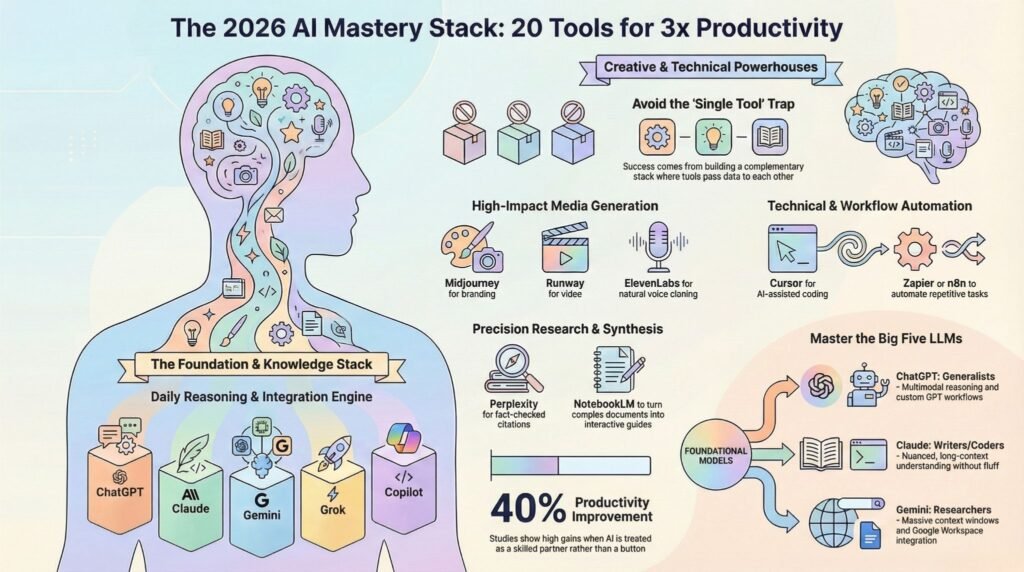
AI adoption has grown rapidly. McKinsey reports that the use of generative AI across organizations nearly doubled to around 40% in professional services by early 2026, and many more individuals use these tools daily. Worldwide AI spending is expected to exceed $2 trillion, fueled by real productivity gains. Some studies show up to a 40% improvement when tools are used effectively.
However, the gap is significant. Many people achieve mediocre results because they treat AI like a magic button rather than a skilled partner. Learning to use the right tools and how to prompt them can turn that gap into your advantage.
These 20 tools were selected based on:
- Real usage frequency in 2026
- Versatility across roles
- Consistent performance across latest models
- Measurable impact (time saved, quality boosted, revenue potential)
I’ve organized them into categories so you can focus on what matters most to you.
1–5: Core Large Language Models (The Foundation You’ll Use Daily)
1. ChatGPT (OpenAI)
Why master it: Still the most versatile all-rounder. Great for casual brainstorming, deep research, voice mode, content drafts, and complex reasoning. In 2026, its browsing, deep research reports, and multimodal capabilities make it indispensable.
Best for: Everyday tasks, content generation, analysis, learning new topics.
Real example: I use it to outline entire blog posts (like this one) in minutes, then refine with specific prompts.
Pro tip: Combine with custom GPTs for specialized workflows.
2. Claude (Anthropic)
Why master it: Excels at long-context understanding, high-quality writing, instruction following, and safe/ethical outputs. Perfect for long-form content, code review, and document-heavy tasks.
Best for: Writing, coding, analysis of large files, task automation.
Why it stands out: Many professionals switch to Claude when they need thoughtful, nuanced responses without fluff.
3. Google Gemini
Why master it: Unmatched multimodal power and massive context windows (up to millions of tokens). Integrates seamlessly with Google Workspace, search, and data tools.
Best for: Research, image/video analysis, Google ecosystem users, complex data synthesis.
Real impact: Analyze hours of video or thousands of pages instantly — a game-changer for researchers and analysts.
4. Grok (xAI)
Why master it: Built for helpful, truthful, and maximally curious responses. Strong real-time knowledge via X integration and fun, direct personality. Free tier access improved significantly in 2026.
Best for: Unfiltered insights, current events, creative problem-solving, technical explanations with humor.
5. Microsoft Copilot (incl. 365 Copilot)
Why master it: Deep integration with Microsoft 365 (Word, Excel, PowerPoint, Teams). Turns your existing documents and data into actionable insights.
Best for: Enterprise users, productivity in Office apps, business reporting, collaboration.
Stat tie-in: Huge adoption in companies already on Microsoft stack for measurable workflow gains.
6–10: Research, Search & Knowledge Tools
6. Perplexity AI
Why master it: Citation-rich, real-time AI search that feels like talking to a research assistant. Reduces hallucination risks with sources.
Best for: Accurate research, fact-checking, competitive analysis, academic-style work.
7. NotebookLM (Google)
Why master it: Turns your uploaded documents into interactive “podcasts,” summaries, study guides, and Q&A. Amazing for processing large knowledge bases.
Best for: Learning, synthesizing reports, creating audio overviews from documents.
8. Zapier (with AI Agents)
Why master it: No-code automation connecting thousands of apps with intelligent AI agents. Automate repetitive workflows across tools.
Best for: Workflow automation, connecting your AI stack, building custom agents.
9. Notion AI
Why master it: AI baked into your workspace for summarizing notes, generating ideas, writing drafts, and organizing knowledge.
Best for: Personal/second brain users, team wikis, project management.
10. Cursor
Why master it: AI-powered code editor (VS Code fork) that understands your entire codebase and helps you build faster.
Best for: Developers who want an AI pair programmer that “gets” the project context.
11–15: Creative & Media Generation Tools
11. Midjourney (or Flux alternatives)
Why master it: Still leads in high-quality, artistic image generation. Version 7+ in 2026 offers better consistency and control.
Best for: Visual content, branding assets, concept art, social media graphics.
12. Adobe Firefly
Why master it: Commercially safe, integrated into Photoshop/Express. Excellent for professional design workflows with strong copyright respect.
Best for: Designers needing enterprise-grade image/video editing with AI.
13. Runway or Google Veo
Why master it: Advanced text-to-video and image-to-video generation. Veo 3+ powers high-quality short clips.
Best for: Video content creators, marketers needing quick social assets.
14. ElevenLabs
Why master it: Best-in-class AI voice cloning and text-to-speech. Natural voices for podcasts, videos, dubbing.
Best for: Audio content, accessibility, multilingual voiceovers.
15. Canva Magic Studio
Why master it: Democratizes design with AI — generate images, edit videos, create presentations from prompts. Perfect for non-designers.
Best for: Quick branded visuals, social media, presentations.
16–20: Specialized & Productivity Powerhouses
16. GitHub Copilot
Why master it: Inline code suggestions and chat in your IDE. Now even smarter with newer models.
Best for: Developers accelerating coding, boilerplate, testing.
17. Jasper AI
Why master it: Specialized for marketing copy, blog posts, and brand voice consistency at scale.
Best for: Content teams producing high-volume marketing material.
18. Synthesia
Why master it: AI avatar video generation — create talking-head videos without filming.
Best for: Training videos, personalized marketing, scalable video content.
19. n8n or Make (with AI nodes)
Why master it: Open-source/flexible automation with strong AI integration for complex workflows.
Best for: Advanced automation without vendor lock-in.
20. OpenRouter
Why master it: One interface to access 600+ models — switch between providers easily for best performance/cost.
Best for: Power users who want flexibility and cost optimization across LLMs.
How to Master These Tools Effectively (Your 2026 Action Plan)
Don’t try to learn all 20 at once. Here’s a practical path:
- Week 1–2: Pick your core LLM (ChatGPT + Claude or Gemini) and master prompting with the 20 essential prompts from my previous guide.
- Week 3–4: Add 2–3 tools from your main category (research for writers, coding for devs, visuals for creators).
- Ongoing: Build automations with Zapier/n8n and experiment with combinations (e.g., Perplexity research → Claude writing → Midjourney visuals).
Track your wins: Time saved, output quality, or revenue impact. Many users report 20–40% productivity boosts once the stack clicks.
Pro tip: Combine tools. Research with Perplexity, draft with Claude, polish visuals with Canva Firefly, and automate delivery with Zapier.
Common Mistakes to Avoid
- Treating every tool the same — each shines in its niche.
- Ignoring prompting quality (garbage in = garbage out).
- Over-relying on one tool instead of building a complementary stack.
- Forgetting ethics, copyright, and data privacy — especially with voice/image tools.
FAQs About the Top AI Tools in 2026
Which AI tool should beginners start with?
ChatGPT or Gemini — they’re the most forgiving and versatile for learning.
Do these tools replace human work?
No. They amplify it. The best results come from human + AI collaboration — strategy and judgment stay with you.
Are free versions enough?
For learning and light use, yes. Upgrade for heavy workloads, longer context, or advanced features.
How do I stay updated as new tools launch?
Follow reliable AI blogs (like this one!), test monthly, and focus on solving real problems rather than chasing hype.
Which tools work best together?
Popular stacks: ChatGPT/Claude + Perplexity + Zapier + Midjourney/Canva for content creators; Cursor + GitHub Copilot + Claude for developers.
Final Thoughts: Build Your AI Superpowers Now
These 20 AI tools are essential for staying competitive in a world driven by artificial intelligence. If you master even half of them, you will save dozens of hours each month while producing better quality work. Start small. Choose three tools today that address your biggest challenges. Experiment with them, track the results, and adjust as needed.
Which of these tools are you most eager to learn first? Share it in the comments. I read every one and often share tailored prompt tips based on how you plan to use them.