

My Honest Verdict After Testing Gamma AI
Gamma AI is really good at making things fast and giving you a first try, especially if you are a student, someone who does marketing, a founder, or anyone who does not like using design tools.
It is very good at taking your ideas and turning them into nice, modern, card-based pictures in just a few seconds.
Gamma AI is not the best choice for work that you will show to clients or for very detailed work.
Gamma AI has some problems, like the layouts can be a bit boring; sometimes there are issues when you try to export things, and you cannot change a lot of the details, which is a problem for people who use it a lot.
Score: 4.1 / 5
Best for: Making presentations for people inside your company, thinking of new ideas, making social media posts with many pictures, simple websites.
Skip if: You need your presentations to be perfect and have all the details right, or if you are making slides for consulting that have a lot of information.
| Pros ✅ | Cons ❌ |
|---|---|
| Blazing fast — full deck in 60 seconds | Layouts can feel repetitive on multiple projects |
| Stunning modern designs out of the box | PPTX exports sometimes lose fidelity |
| Super easy for non-designers | Free plan credits are one-time only (not monthly) |
| Real-time collaboration + analytics (paid) | Trustpilot support complaints are common |
| Clean card-based editor with AI “Sparkle” edits | Not ideal for very text-heavy or complex decks |
| Generous free tier to test | Limited advanced animations/transitions |
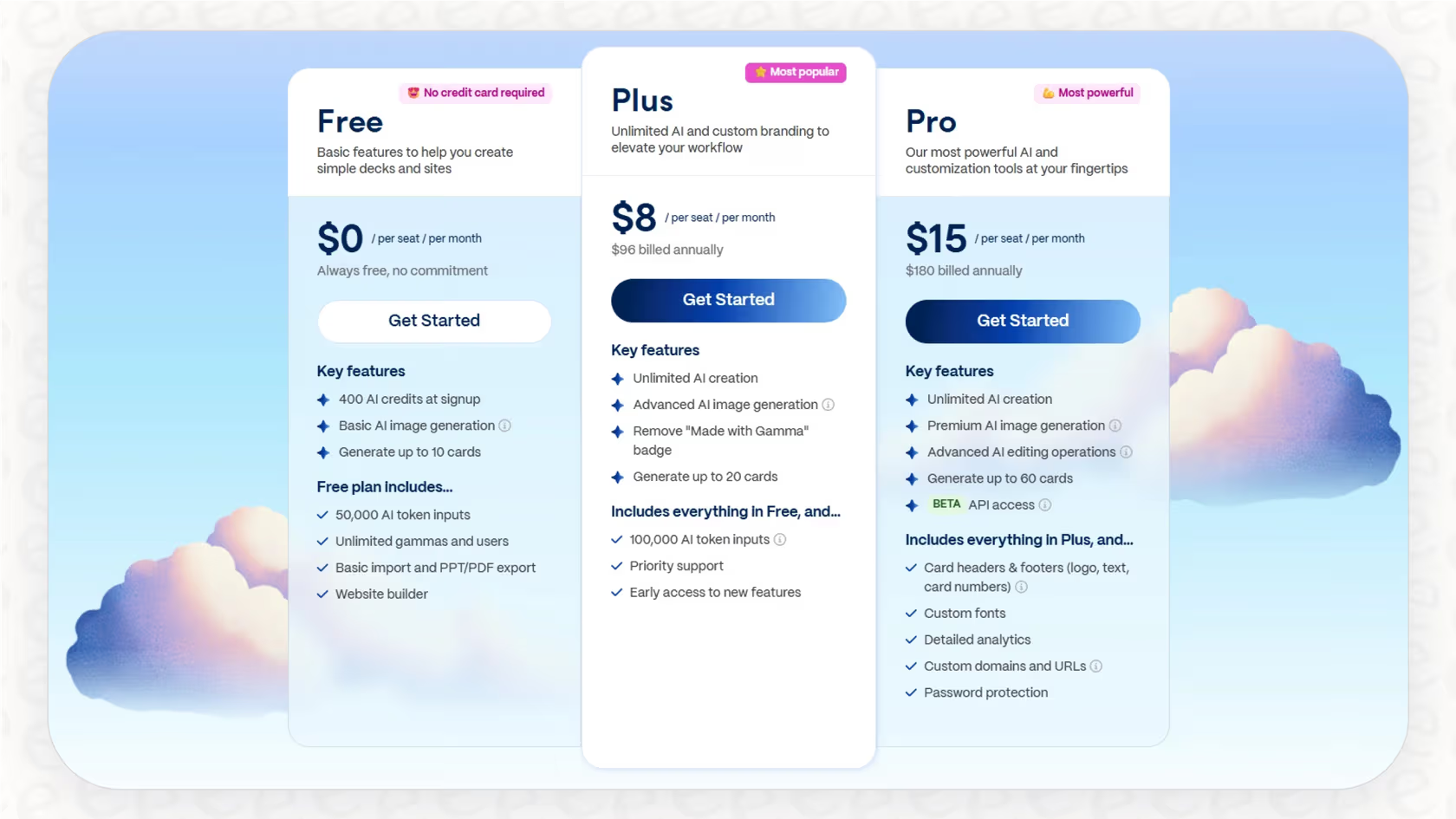
Gamma AI Pricing in 2026
| Plan | Price (Annual / Monthly) | AI Credits | Key Features | Best For |
|---|---|---|---|---|
| Free | $0 | 400 one-time | 10 cards/prompt, basic models, branding | Testing & light use |
| Plus | $8 / $10 | Unlimited | No branding, advanced images, 20 cards | Individuals & freelancers |
| Pro | $15 / $20 | Unlimited | Premium models, analytics, custom branding, 60 cards, API | Professionals & teams |
| Team / Ultra | $20+/seat or $100+ | Higher limits | Advanced admin, more domains, priority support | Larger organizations |
Real User Feedback (Reddit and Trustpilot)
Positive and negative comments are mostly on Reddit.
Here are some of them:
- “It cuts my 6-hour deck to 2 hours.”
- “It is best for internal updates and creative carousels.”
Users really like how fast it works and how modern it looks. - On the other hand, negative comments are mostly on Trustpilot, with ratings around 1.7 to 2.0 out of 5.
Some of the complaints are: - Customer support is not good.
- The AI fails when edit requests get complex.
- “PPTX export breaks formatting.”
Some users also find that layouts start to look too similar after a few uses.
Overall, users love it for its speed and ease of use.
However, they criticize it for not being polished for high-stakes work.
Is Gamma AI Worth It in 2026?
Yes. If you want to create things and have a modern look without knowing how to design.
No. If you need everything to work perfectly with PowerPoint. If you want to make presentations that are very customized and contain a lot of information in them, you might want to try Beautiful.ai or Canva Magic Studio.
The best way to do this is to start with the basic version and then pay a little money to upgrade to Plus. This will cost you around eight to ten dollars per month. It is suitable for most people. You should only get the Pro version if you need to know more about how people are using your presentations and if you want to be able to add your own brand to things.
FAQ
Q: Is Gamma AI free?
A: Yes — with 400 starter credits. Enough to create 8–10 decks.
Q: How good are the exports?
A: PDF is excellent. PPTX works but may need minor tweaks.
Q: Is it good for teams?
A: Yes on Pro/Team plans (real-time editing + analytics).
Q: Better than Canva or Beautiful.ai?
A: Faster generation. Canva wins for manual control; Beautiful.ai for slide-specific design.