
Why Most People Only Use 20% of Gamma’s Power
It is time for the features that separate beginners from power users. These fifteen tips will save you hours every week. Make your output look like a full design team built the design. The advanced features are really important for power users. The fifteen tips are very useful for people who want to create good designs. The advanced features and the fifteen tips will help you a lot.
1. Unlock the Gamma Agent (Your AI Teammate)
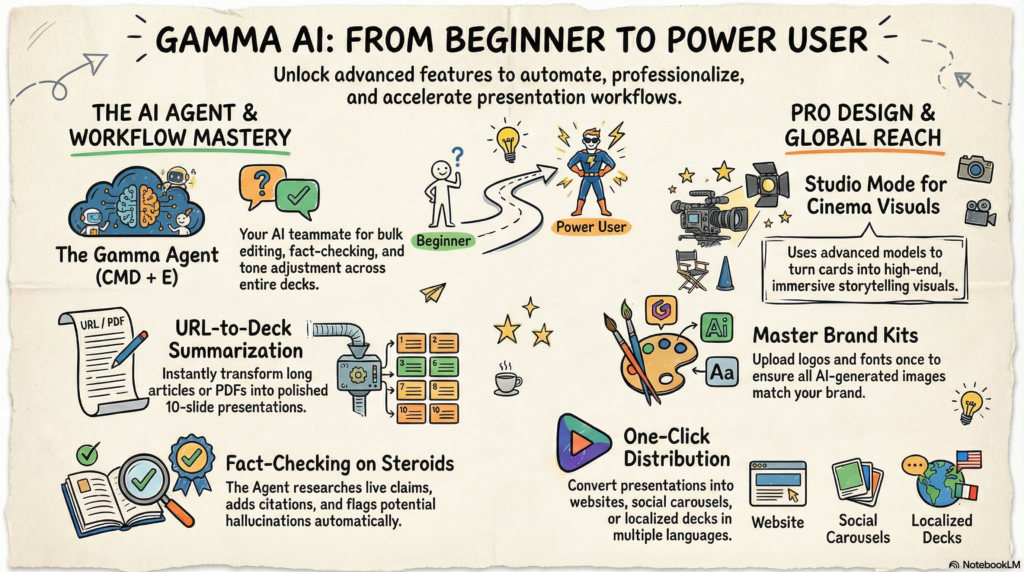
The Gamma Agent (Agent button or CMD + E) is the single biggest workflow multiplier.
- Fact-check claims and add citations automatically
- Rewrite the entire deck in a new tone (“make this more persuasive for executives”)
- Research competitors or add market data on the fly
- Bulk edit: “Add a timeline to every section” or “Shorten all text by 30%”
2. Switch to Studio Mode for Cinematic Visuals
Studio Mode turns every card into a single AI-generated image with embedded text — perfect for immersive storytelling.
- Go to theme settings → Choose Studio (Pro plan)
- Uses advanced models like Nano Banana Pro/HD
- Ideal for marketing carousels, product launches, and thought leadership
Result: Your deck looks like a high-end keynote instead of standard slides.
3. Smart Summarization from Any URL
Paste a long article, blog, or competitor page → Gamma turns it into a polished deck instantly.
- In Generate or Agent: Paste URL and say “Summarize this into a 10-slide presentation”
- Works with PDFs and documents too
Use case: Turn a 3,000-word report into client-ready slides in under 90 seconds.
4. Master Brand Kit + AI Image Style Keywords
Upload your logo, colors, and fonts once → everything stays on-brand.
- In Theme → Customize → Add AI Image Style Keywords (e.g., “minimalist tech, cyberpunk neon, clean corporate”)
- All future AI images match your brand automatically
Game-changer for agencies and teams.
5. Advanced AI Image Generation & In-Card Editing
Type / → AI Image or click the image icon.
- Generate, regenerate, or edit directly: remove background, add elements, change style
- Right-click any image for quick AI tweaks
Pro trick: Combine with Brand Kit keywords for perfectly consistent visuals.
6. Instant Translation Across All Slides
Need the same deck in Spanish, French, or German?
- Open Agent → “Translate entire presentation to Spanish, keep professional tone”
One command = fully localized deck.
7. 7 Must-Know Keyboard Shortcuts
Speed up 5x with these:
| Shortcut | What It Does |
|---|---|
| CMD + E | Open Gamma Agent |
| CMD + K | Search all your Gammas |
| CMD + Enter | Enter Present mode instantly |
| / | Slash command to insert anything |
| CMD + L | Highlight URL for Agent to summarize |
| Escape | Exit Present mode |
| * | Split card instantly |
8. Fact-Checking on Steroids
Ask the Agent: “Fact-check all claims and add sources.”
It researches live, adds citations, and even flags potential hallucinations. (Still double-check important numbers.)
9. Remix Any Gamma for New Audiences
Finished a deck? Click Remix → “Adapt this for a C-level executive audience” or “Make it beginner-friendly for students.”
Instant personalization without starting over.
10. Smart Layouts & / Commands
While editing, type / to instantly add:
- Charts, timelines, comparison tables
- Smart layouts (auto-adjusts content)
- Embeds (YouTube, Spotify, Figma, etc.)
11. Version History & Branching
Never lose a great version again.
Duplicate → Branch → Test radical changes safely.
12. Deep Analytics (Pro Plan)
Track who opens your Gamma, how long they spend on each slide, and drop-off points. Perfect for sales and marketing teams.
13. Prompt Engineering Inside Gamma
Best results come from specific prompts. Example:
“Create a 12-slide deck for [topic]. Audience: [who]. Tone: [professional/conversational]. Include [sections]. Use Studio Mode and dark cyber-tech theme.”
14. Turn Any Deck Into a Website or Social Carousel
One click: Convert presentation → Full website or LinkedIn/Twitter carousel format.
15. API + Zapier Automation (Pro/Ultra)
Connect Gamma to your CRM, Notion, or Slack. Auto-generate weekly reports or client updates.
FAQ: Gamma AI Advanced Features
Q: Do I need Pro for most of these?
A: Agent, Studio Mode, Brand Kit, and Analytics are Pro+. Free/Plus still get huge value from shortcuts and basic Agent.
Q: Is Studio Mode worth it?
A: Yes — if you want cinematic, image-first designs that stand out.
Q: Can the Agent really fact-check?
A: It does a solid job and adds sources, but always verify critical data.